Part 6 of the series. Part 5 gave LND an RPC login to bitcoind and turned on the ZMQ feeds.
Configuring LND
lnd.conf
LND’s configuration lives in /etc/lnd/lnd.conf, in the directory Part 4 created for it: owned by root, readable by the lnd group. It tells LND where bitcoind is and how to log in, using the lnd user and the password rpcauth.py printed in Part 5.
sudo cat /etc/lnd/lnd.conf![sudo cat /etc/lnd/lnd.conf: [Application Options] alias=local-lnd, listen=127.0.0.1:9735, rpclisten=127.0.0.1:10009, restlisten=127.0.0.1:8080; [Bitcoin] bitcoin.active=1, bitcoin.regtest=1, bitcoin.node=bitcoind; [Bitcoind] bitcoind.rpchost=127.0.0.1:18443, bitcoind.rpcuser=lnd, bitcoind.rpcpass= followed by the covered password, bitcoind.zmqpubrawblock=tcp://127.0.0.1:28332, bitcoind.zmqpubrawtx=tcp://127.0.0.1:28333](/_astro/lnd-conf.Dm_uCth9_1SsQLD.webp)
The RPC password is covered.
| Setting | Meaning |
|---|---|
alias=local-lnd | The node’s display name in the Lightning network graph |
listen=127.0.0.1:9735 | The Lightning peer-to-peer port, on loopback only for now: no node outside the VM can open a channel connection to it |
rpclisten=127.0.0.1:10009 | LND’s gRPC API, which lncli uses |
restlisten=127.0.0.1:8080 | The same API over REST |
bitcoin.active=1, bitcoin.regtest=1 | Run on Bitcoin’s regtest chain, the one bitcoind is on. LND’s log later flags bitcoin.active as deprecated; bitcoin.regtest=1 alone is enough |
bitcoin.node=bitcoind | Use a full bitcoind as the chain backend |
bitcoind.rpchost=127.0.0.1:18443 | Where bitcoind’s RPC listens, from Part 2’s bitcoin.conf |
bitcoind.rpcuser=lnd, bitcoind.rpcpass=… | The rpcauth login from Part 5 |
bitcoind.zmqpubrawblock, bitcoind.zmqpubrawtx | The two ZMQ sockets from Part 5, which LND subscribes to |
The two sides of each connection now match: the RPC address and login on the bitcoind side and the LND side, and the same two ZMQ addresses on both.
Who listens, who connects
In this lab, Bitcoin Core and LND run in the same VM, so every address is 127.0.0.1, the loopback address. Each one is either a port a program listens on, or a port another program connects to:
| Address | Listening | Connecting | Used for |
|---|---|---|---|
127.0.0.1:18443 | Bitcoin Core | LND, bitcoin-cli | Bitcoin RPC: looking up blocks, submitting transactions |
127.0.0.1:28332 | Bitcoin Core | LND | ZMQ block notifications |
127.0.0.1:28333 | Bitcoin Core | LND | ZMQ transaction notifications |
127.0.0.1:9735 | LND | Other Lightning nodes | Peer connections: channel and payment messages |
127.0.0.1:10009 | LND | lncli and other tools | LND’s gRPC admin API |
127.0.0.1:8080 | LND | REST API clients | LND’s REST admin API |
So the lines in lnd.conf point in different directions, even though they look alike:
# LND waits for connections on this address
rpclisten=127.0.0.1:10009

# LND connects out to Bitcoin Core at this address
bitcoind.rpchost=127.0.0.1:18443
The ZMQ addresses are connection targets from LND’s side too. LND subscribes to sockets that bitcoind opened, and tcp:// names the transport:
bitcoind.zmqpubrawblock=tcp://127.0.0.1:28332Beyond the lab
On a production node, these addresses don’t all change the same way. Only one of them is meant for the outside world:
| Port | In production |
|---|---|
9735 (Lightning P2P) | The one port that should be reachable from the internet, so other nodes can connect and open channels. LND listens on a public interface and advertises its public IP with externalip |
18443 (Bitcoin RPC; 8332 on mainnet) | Never public. If Bitcoin Core runs on a different machine from LND, reach it over a private network or VPN, and limit rpcallowip to LND’s address |
28332, 28333 (ZMQ) | Never public. As Part 5 showed, ZMQ has no login, so the network is its only protection |
10009, 8080 (gRPC, REST) | Keep private. They’re LND’s admin interface, protected by macaroons and TLS, but there’s no reason to expose them to the internet |
Changing every 127.0.0.1 to a public IP would put the Bitcoin RPC and the unauthenticated ZMQ feeds on the internet. The lab’s loopback-only setup is the safe default; only the Lightning port gets opened later, on purpose.
This file holds a secret. bitcoin.conf only stores a salt and HMAC, but LND needs the actual password to log in, so bitcoind.rpcpass is in plain text here. The file’s permissions are what protect it, so it gets the same treatment as bitcoin.conf in Part 2: root:lnd and 0640, readable by the lnd group and nobody else.
Running LND with systemd
The unit file
LND gets a unit file built the same way as bitcoind’s in Part 3:
sudo tee /etc/systemd/system/lnd.service > /dev/null <<'EOF'
[Unit]
Description=LND regtest node
Wants=bitcoind.service
After=bitcoind.service

[Service]
Type=simple
User=lnd
Group=lnd
ExecStart=/usr/local/bin/lnd --configfile=/etc/lnd/lnd.conf --lnddir=/var/lib/lnd
Restart=on-failure
RestartSec=5
TimeoutStopSec=300
UMask=0077
NoNewPrivileges=true
ProtectHome=true
ProtectSystem=full

[Install]
WantedBy=multi-user.target
EOF![sudo tee /etc/systemd/system/lnd.service > /dev/null <<'EOF' with [Unit] Description=LND regtest node, Wants=bitcoind.service, After=bitcoind.service; [Service] Type=simple, User=lnd, Group=lnd, ExecStart=/usr/local/bin/lnd --configfile=/etc/lnd/lnd.conf --lnddir=/var/lib/lnd, Restart=on-failure, RestartSec=5, TimeoutStopSec=300, UMask=0077, NoNewPrivileges=true, ProtectHome=true, ProtectSystem=full; [Install] WantedBy=multi-user.target](/_astro/lnd-service-unit.AtQze9F2_2jEfo.webp)
Most of it is Part 3’s unit with bitcoin swapped for lnd: the same restart policy, the same shutdown window, and the same four hardening lines. The new parts:
| Directive | Meaning |
|---|---|
Wants=bitcoind.service | Starting LND also asks systemd to start Bitcoin Core |
After=bitcoind.service | Start LND only after Bitcoin Core’s start job has run |
User=lnd, Group=lnd | Run as LND’s own account |
--configfile=/etc/lnd/lnd.conf | Use the configuration written above, instead of LND’s default under its data directory |
--lnddir=/var/lib/lnd | Keep the wallet, the channel database, the TLS certificate, and the macaroons under /var/lib/lnd, the 0700 directory from Part 4 |
Wants= and After= do different jobs, which is why both are here. Wants= pulls Bitcoin Core in; After= orders the two.
Neither one says anything about the RPC connection between them. systemd manages processes: it can start bitcoind before LND, but it doesn’t know what RPC is, and After= waits only for bitcoind’s process to be started, not for its RPC to answer. Whether LND can actually reach bitcoind, with the right address, the rpcauth login, and the ZMQ feeds, is a separate question, answered by LND’s own logs once it runs. If LND comes up before bitcoind’s RPC is ready, Restart=on-failure tries again five seconds later; if the address or the password is wrong, restarting won’t fix it, and the logs will say so.
Checking, starting, and the first status
The same three steps as for bitcoind in Part 3, then status:
sudo systemd-analyze verify /etc/systemd/system/lnd.service
sudo systemctl daemon-reload
sudo systemctl start lnd
sudo systemctl status lnd --no-pager -l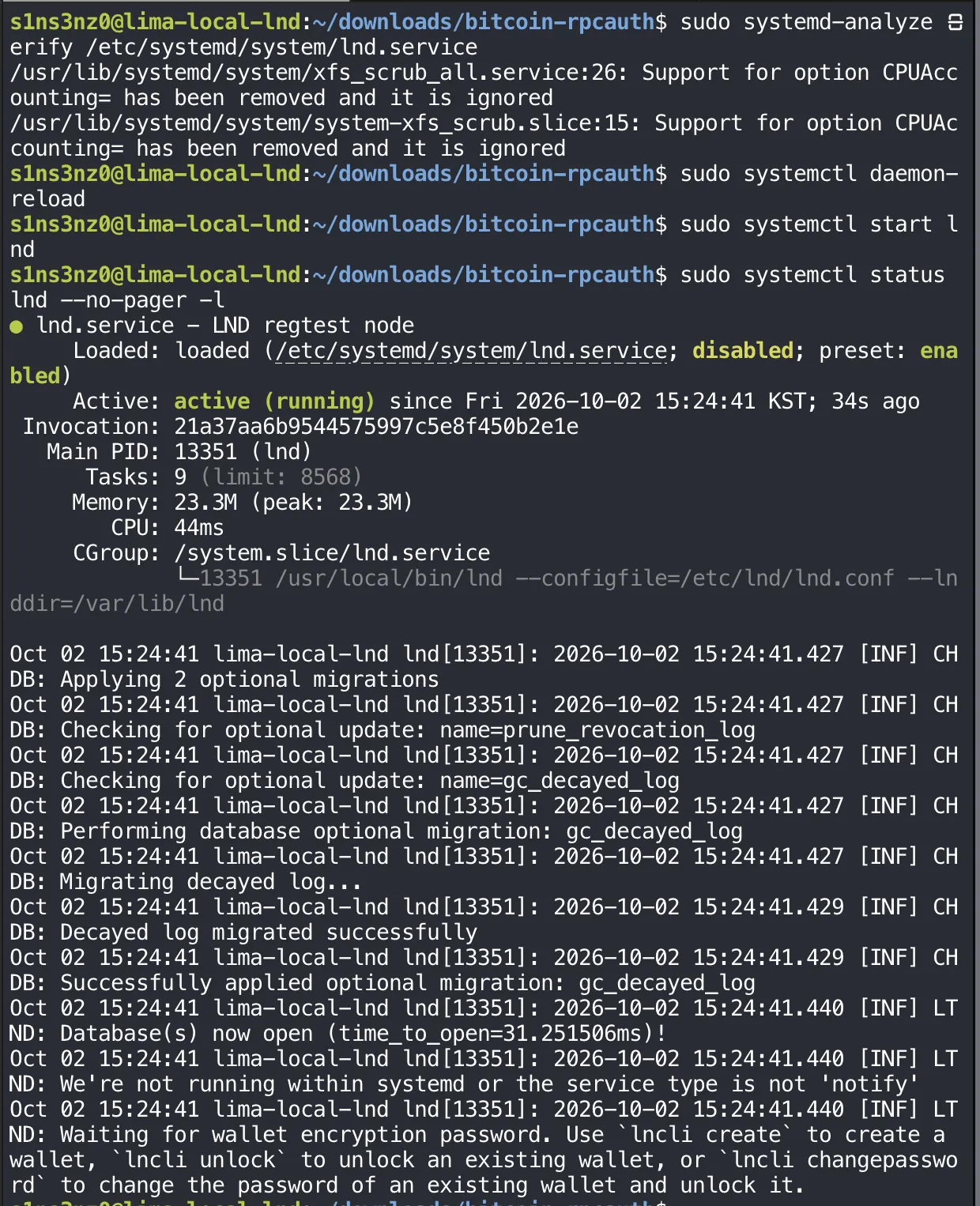
verify flagged nothing in lnd.service; the two warnings are the same Ubuntu XFS units as in Part 3. LND is active (running) as its own process, with the configuration and data paths from the unit.
The log tells the rest of the story:
| Log line | Meaning |
|---|---|
CHDB: … optional migration … | LND created its channel database and applied its built-in migrations. On a fresh /var/lib/lnd there’s nothing to migrate yet, so these finish instantly |
LTND: Database(s) now open | The databases under --lnddir are open, so the lnd user can write to its data directory |
We're not running within systemd or the service type is not 'notify' | LND can tell systemd when it’s ready, but only with Type=notify. With Type=simple, systemd counts LND as started as soon as the process exists |
Waiting for wallet encryption password | LND stops here until a wallet is created or unlocked |
That last line is where this part of the setup ends. A running process isn’t a working node yet: LND hasn’t connected to bitcoind at this point, because it starts its chain backend only after the wallet is unlocked. So the RPC login and the ZMQ feeds still haven’t been tested by LND itself. Creating the wallet comes next, and LND’s logs after that will show whether it reached bitcoind.
Loaded: … disabled is also back, the same as bitcoind in Part 3 before enable. Once LND has shown it can run end to end, sudo systemctl enable lnd wires it to boot the same way.
The full log with journalctl
status shows only the last few lines. When something goes wrong, the full log is in the systemd journal, which collects the output of both services:
sudo journalctl -u lnd -n 40 --no-pager![sudo journalctl -u lnd -n 40 --no-pager: systemd Started lnd.service - LND regtest node; [WRN] LTND: Config 'bitcoin.active' is deprecated, please remove it; Version Info version=0.21.3-beta commit=v0.21.3-beta debuglevel=production; Network Info active_chain=Bitcoin network=regtest; RPCS: Generating TLS certificates, Done generating TLS certificates; RPC server listening on 127.0.0.1:10009; gRPC proxy started at 127.0.0.1:8080; Opening the main database; Creating local graph and channel state DB instances; CHDB schema check and migrations; Database(s) now open; Waiting for wallet encryption password](/_astro/lnd-journal.-044WzTW_2tczLz.webp)
| Option | Meaning |
|---|---|
-u lnd | Only this unit’s messages |
-n 40 | The last 40 lines |
--no-pager | Print straight to the terminal |
The earlier lines that status cut off fill in the startup:
| Log line | Meaning |
|---|---|
[WRN] Config 'bitcoin.active' is deprecated, please remove it | The only warning. LND no longer needs bitcoin.active to pick Bitcoin, so the line can be dropped from lnd.conf; it’s harmless if left |
Version Info … version=0.21.3-beta commit=v0.21.3-beta | The running binary is the release verified in Part 4 |
Network Info … network=regtest | LND is on regtest, matching bitcoind |
Generating TLS certificates | First start: LND created its own TLS certificate and key under /var/lib/lnd, for its gRPC and REST APIs |
RPC server listening on 127.0.0.1:10009 | The gRPC API is up, on loopback as configured |
gRPC proxy started at 127.0.0.1:8080 | The REST API is up, on loopback too |
Opening the main database, Creating local graph and channel state DB instances | LND set up its databases in the data directory |
Waiting for wallet encryption password | The last line: LND is waiting for a wallet to be created or unlocked |
So the two admin APIs are listening where lnd.conf says, and nothing failed. The wallet is next.
Creating the wallet
LND keeps its on-chain funds and channel keys in a wallet, and it won’t go further until that wallet exists. lncli create makes one through the gRPC API that’s already listening:
sudo -u lnd lncli --lnddir=/var/lib/lnd --network=regtest --rpcserver=127.0.0.1:10009 create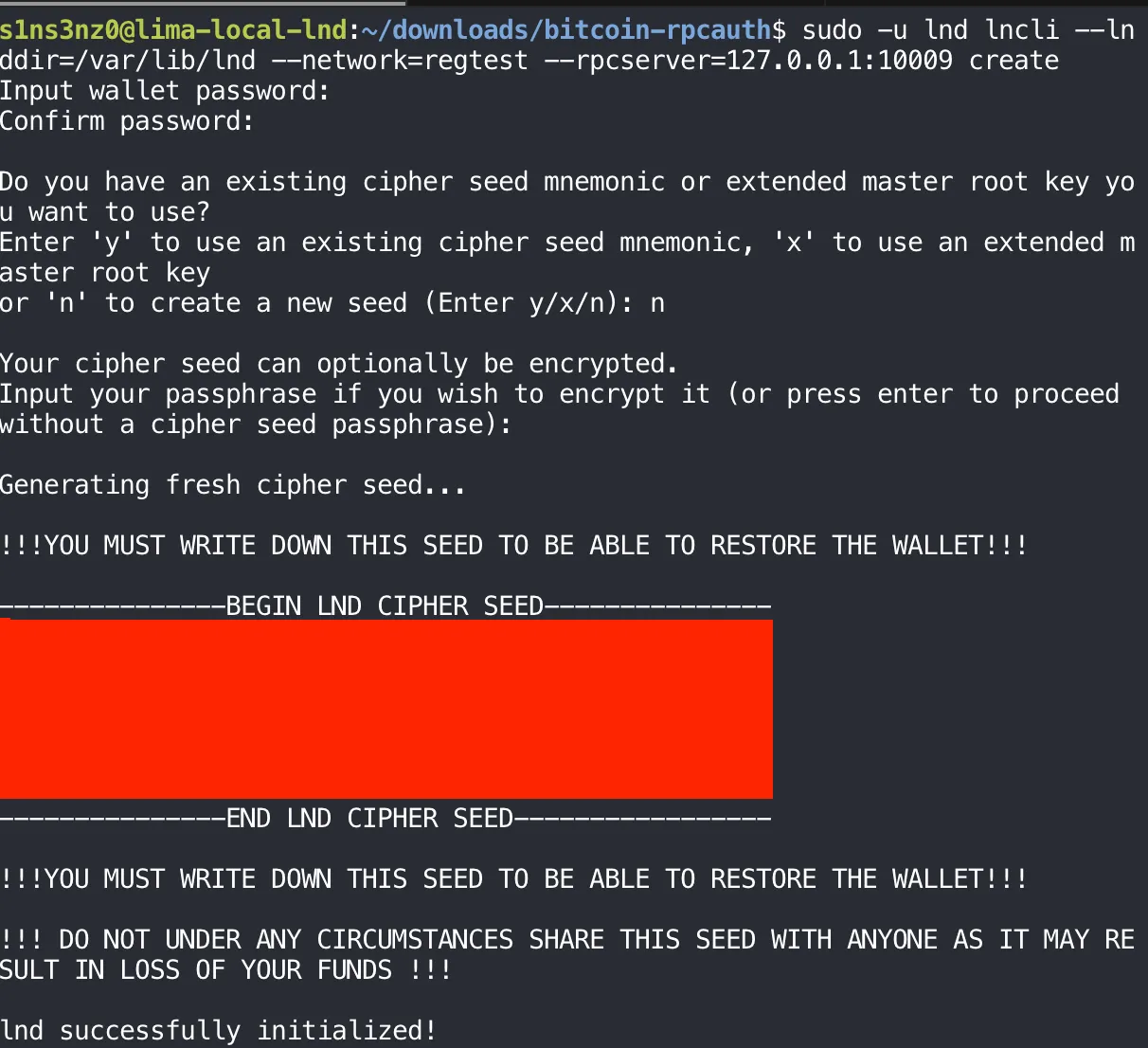
The cipher seed is covered.
| Part | Why |
|---|---|
sudo -u lnd | lncli needs LND’s TLS certificate from /var/lib/lnd, and only lnd can read that 0700 directory |
--lnddir=/var/lib/lnd | Where to find that certificate, since it isn’t in the default ~/.lnd |
--network=regtest | Match the node’s chain |
--rpcserver=127.0.0.1:10009 | The gRPC address from lnd.conf |
create asks three things:
| Prompt | What I chose | What it does |
|---|---|---|
| Wallet password | A new password, entered twice | Encrypts the wallet file on disk. LND needs it at every start to unlock the wallet |
Existing seed or new (y/x/n) | n | Generate a fresh seed instead of restoring one |
| Cipher seed passphrase | None (Enter) | An optional extra secret mixed into the seed; without it, the seed words alone restore the wallet |
LND then prints the cipher seed: 24 words that can recreate the wallet’s keys on any machine. I wrote them down and stored them away from the VM. The password and the seed do different jobs. The password protects the wallet file on this disk; the seed is the wallet itself, so anyone holding the words holds the funds, which is why LND prints the warning twice. These are regtest coins, but I treat the seed the way I would on mainnet.
lnd successfully initialized! means the wallet exists and is unlocked, so LND can now move past the line it was waiting on and start its chain backend.
Is LND talking to bitcoind?
getinfo is the quickest way to see what LND knows about the chain, and the chain is something it can only learn from bitcoind:
sudo -u lnd lncli --lnddir=/var/lib/lnd --network=regtest --rpcserver=127.0.0.1:10009 getinfo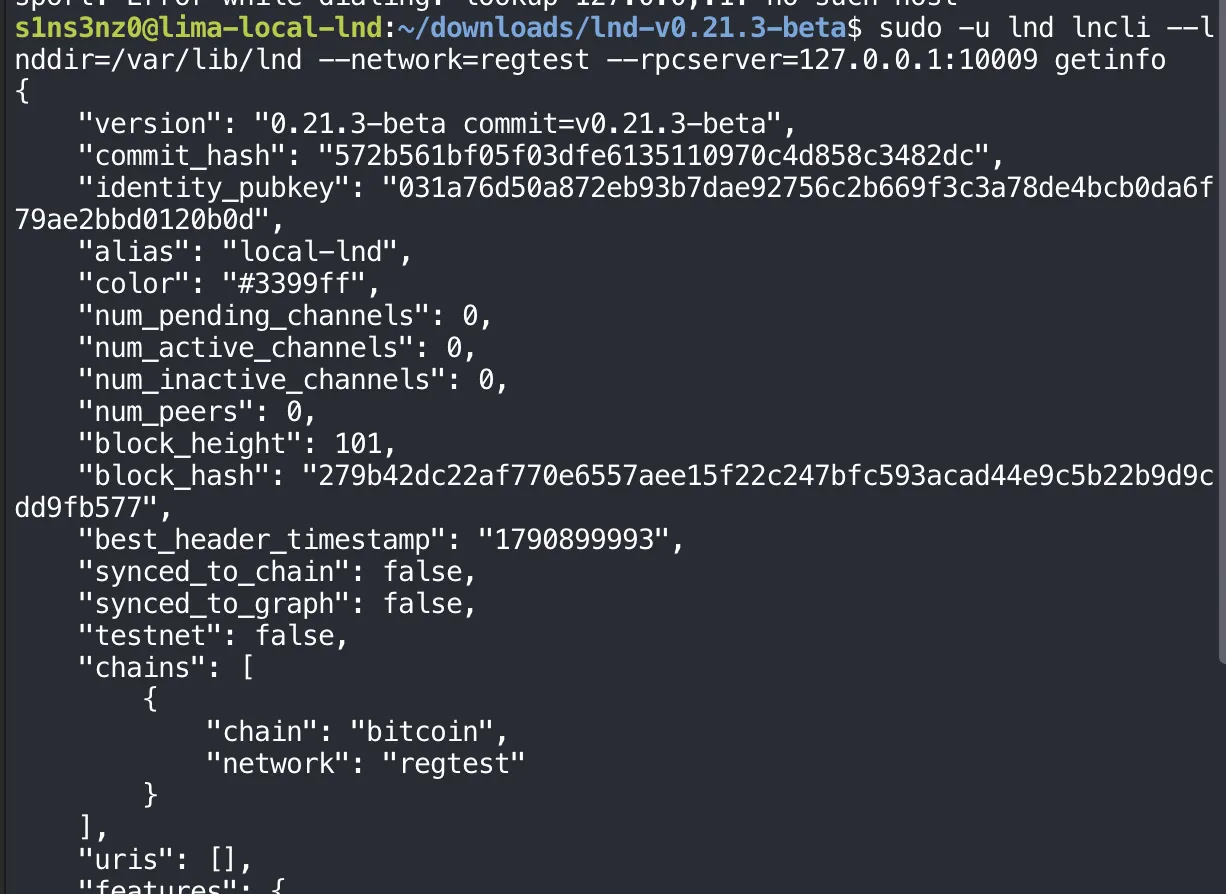
| Field | Value | Meaning |
|---|---|---|
identity_pubkey | 031a76d5…120b0d | The node’s public key, derived from the new wallet’s seed. This is how other Lightning nodes will know it |
alias | local-lnd | From lnd.conf |
block_height | 101 | The height bitcoind reported in Part 3 |
block_hash | 279b42…b577 | The exact tip hash from Part 3. LND could only know it by asking bitcoind |
best_header_timestamp | 1790899993 | That tip’s timestamp, the same time bitcoind showed |
synced_to_chain | false | See below |
synced_to_graph | false | No peers, so there’s no Lightning network graph to sync. Expected for a lone node |
num_peers, channels | 0 | Nothing connected yet |
chains | bitcoin, regtest | The chain and network from lnd.conf |
uris | [] | No advertised address, because listen is on loopback only |
The tip height and hash match bitcoind exactly, which answers the question this part kept open: LND logged in over RPC with the rpcauth credentials and is reading the chain from the local Bitcoin Core.
synced_to_chain: false looks wrong next to a matching tip, but it comes from the tip’s age, not from the connection. Like initialblockdownload in Part 3, LND judges whether it’s caught up partly by how recent the best block is, and the last block on this chain was mined hours before this check. On regtest no new block arrives unless I mine one.
So I mined one more block, and added an lncli shortcut, lnc, built like Part 3’s btc:
MINER_ADDRESS=$(btc -rpcwallet=miner getnewaddress)
btc generatetoaddress 1 "$MINER_ADDRESS"
lnc() {
  sudo -u lnd lncli \
    --lnddir=/var/lib/lnd \
    --network=regtest \
    --rpcserver=127.0.0.1:10009 \
    "$@"
}
lnc getinfo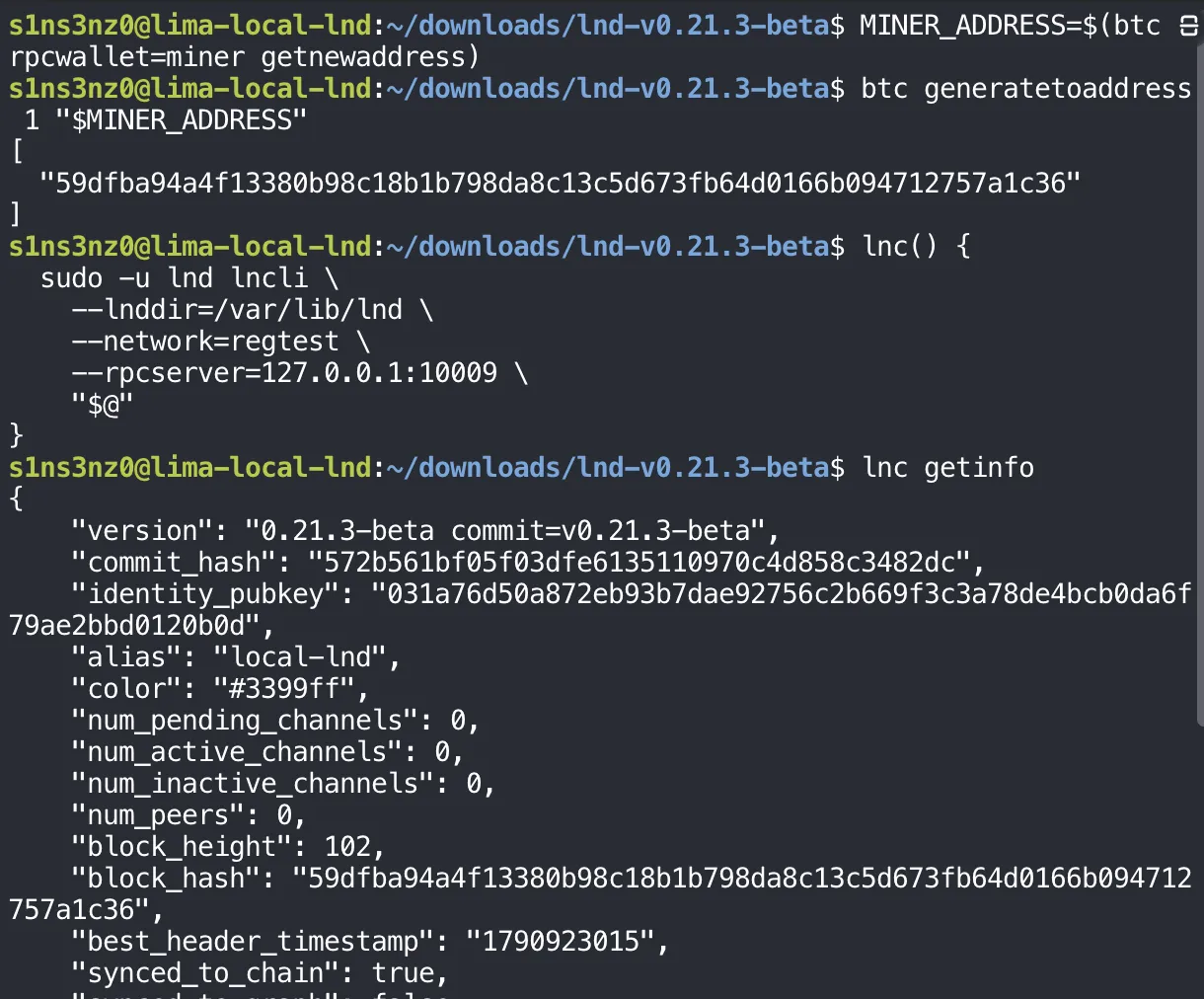
MINER_ADDRESS is set again because shell variables don’t outlive the session where Part 3 created it. The new address comes from the same miner wallet.
| Field | Before | After |
|---|---|---|
block_height | 101 | 102 |
block_hash | 279b42…b577 | 59dfba…1c36, the hash generatetoaddress just printed |
best_header_timestamp | 1790899993 | 1790923015, a few seconds before the check |
synced_to_chain | false | true |
A fresh tip was all synced_to_chain needed, as expected. The block hash matters more: LND reports the block bitcoind mined moments earlier, without being restarted or asked to look. With a bitcoind backend, LND learns about new blocks from the zmqpubrawblock feed, so this is the ZMQ path from Part 5 working end to end, alongside the RPC login.
LND is running under systemd, logged in to Bitcoin Core over RPC, receiving blocks over ZMQ, and synced to the chain.
Funding the LND wallet
An address and an unconfirmed deposit
A Lightning node needs on-chain bitcoin before it can open a channel. LND’s wallet can hand out as many receiving addresses as needed, one per deposit if I like, so I asked it for a new one and sent it 1 BTC from the miner wallet:
lnc newaddress p2wkh
read -r -p 'LND deposit address: ' LND_ADDRESS
btc -rpcwallet=miner -named sendtoaddress address="$LND_ADDRESS" amount=1 fee_rate=2
btc getrawmempool
lnc walletbalance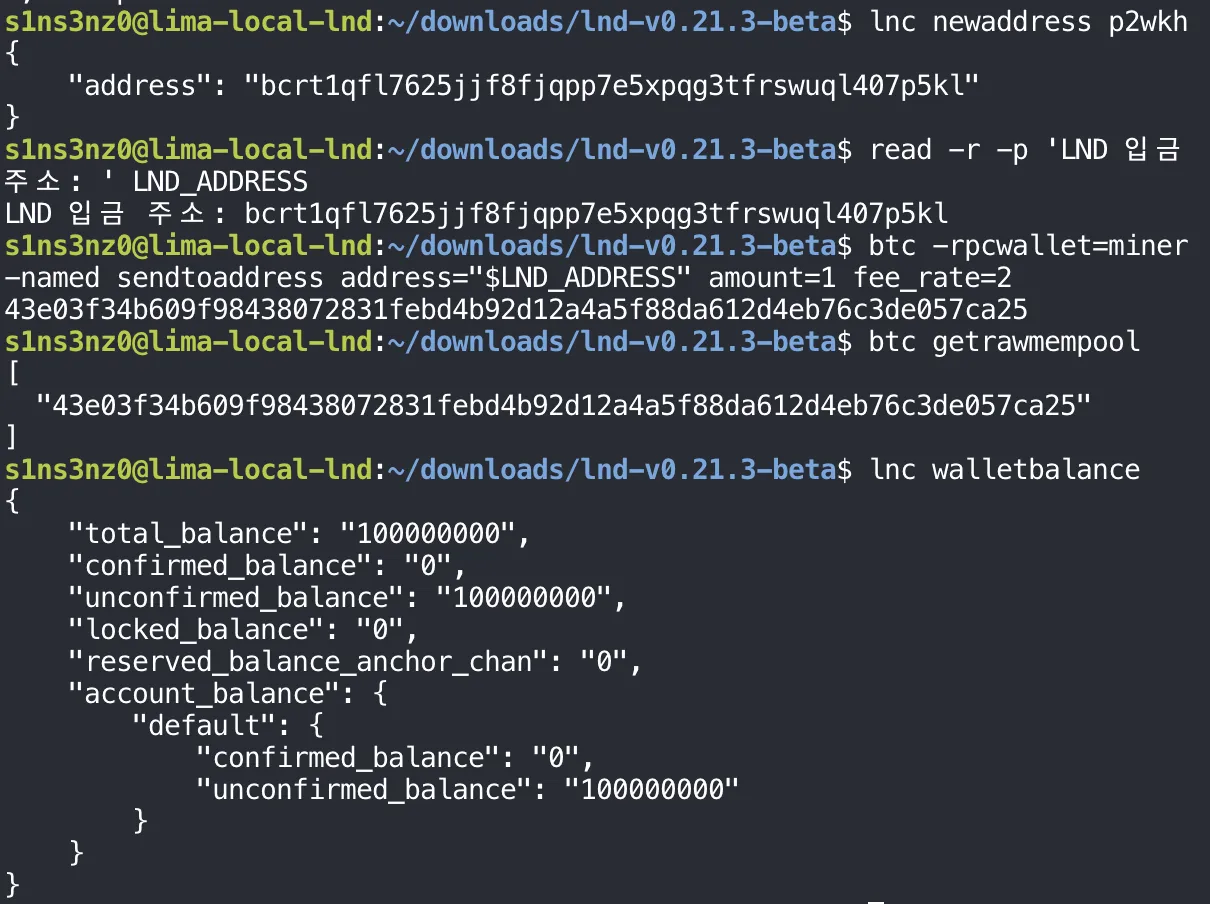
The read prompt in the screenshot is in Korean; it means “LND deposit address”.
| Step | Meaning |
|---|---|
lnc newaddress p2wkh | A new native SegWit (bcrt1q…) address from LND’s wallet |
read -r -p … LND_ADDRESS | Paste the address into a variable, so the next command can’t be mistyped |
sendtoaddress … amount=1 fee_rate=2 | The miner wallet pays 1 BTC to LND, at a fee rate of 2 sat/vB. It returns the transaction ID |
getrawmempool | The transaction is waiting in bitcoind’s mempool. No block has included it yet |
lnc walletbalance | LND’s view of its own funds, in satoshis |
walletbalance shows 100,000,000 sat, exactly 1 BTC, as unconfirmed_balance, with nothing confirmed yet. That matches the mempool: the payment exists but isn’t in a block.
LND knowing about it at all is the other half of the ZMQ check. The transaction is only in bitcoind’s mempool, and the way LND hears about mempool transactions is the zmqpubrawtx feed from Part 5. The block feed showed up in the height change above; this shows the transaction feed.
Confirming it
Mining one block puts the payment into the chain:
MINER_ADDRESS=$(btc -rpcwallet=miner getnewaddress)
btc generatetoaddress 1 "$MINER_ADDRESS"
btc getrawmempool
lnc walletbalance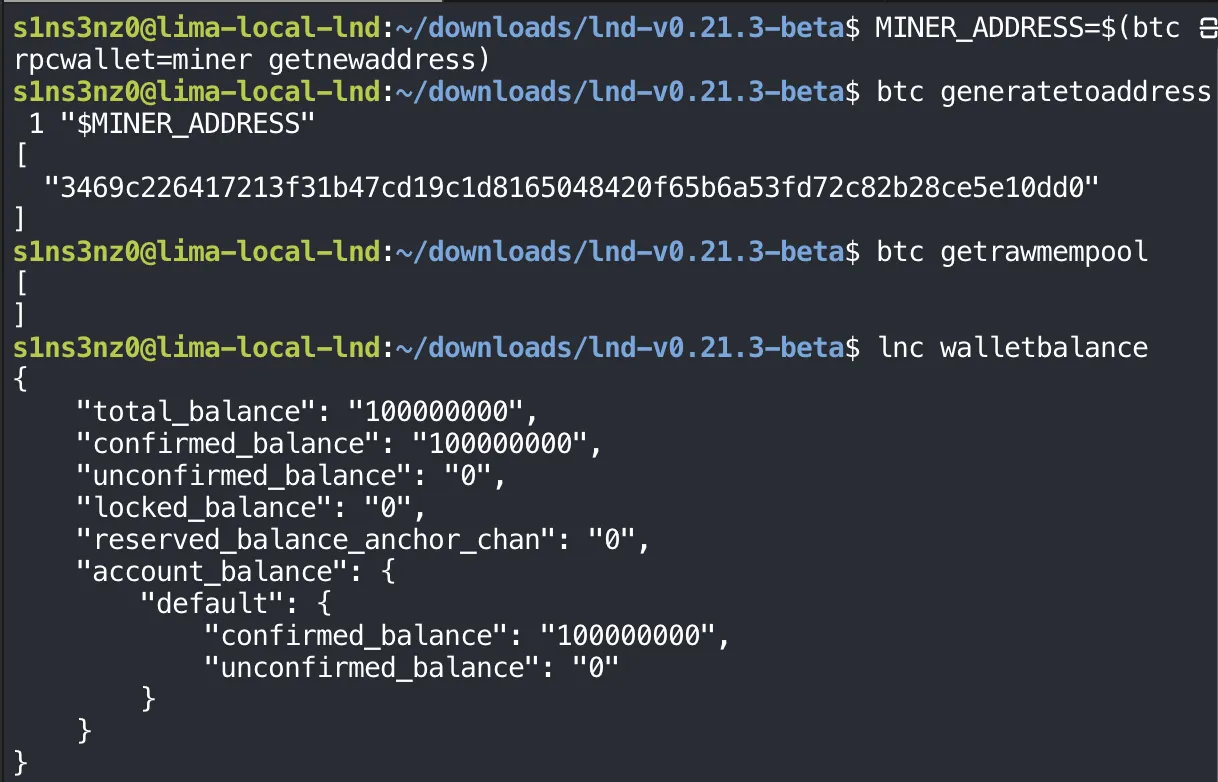
| Before the block | After the block | |
|---|---|---|
getrawmempool | The payment’s txid | Empty: the block took it |
confirmed_balance | 0 | 100,000,000 sat |
unconfirmed_balance | 100,000,000 sat | 0 |
The mempool is empty because the new block included the payment, and LND moved the full 1 BTC from unconfirmed to confirmed. It learned about the block over ZMQ again, without being asked. The node now has confirmed funds on chain, which is what opening a channel will need.
Reading the transaction from LND’s side
listchaintxns lists the on-chain transactions LND’s wallet is involved in, with everything it knows about each:
lnc listchaintxns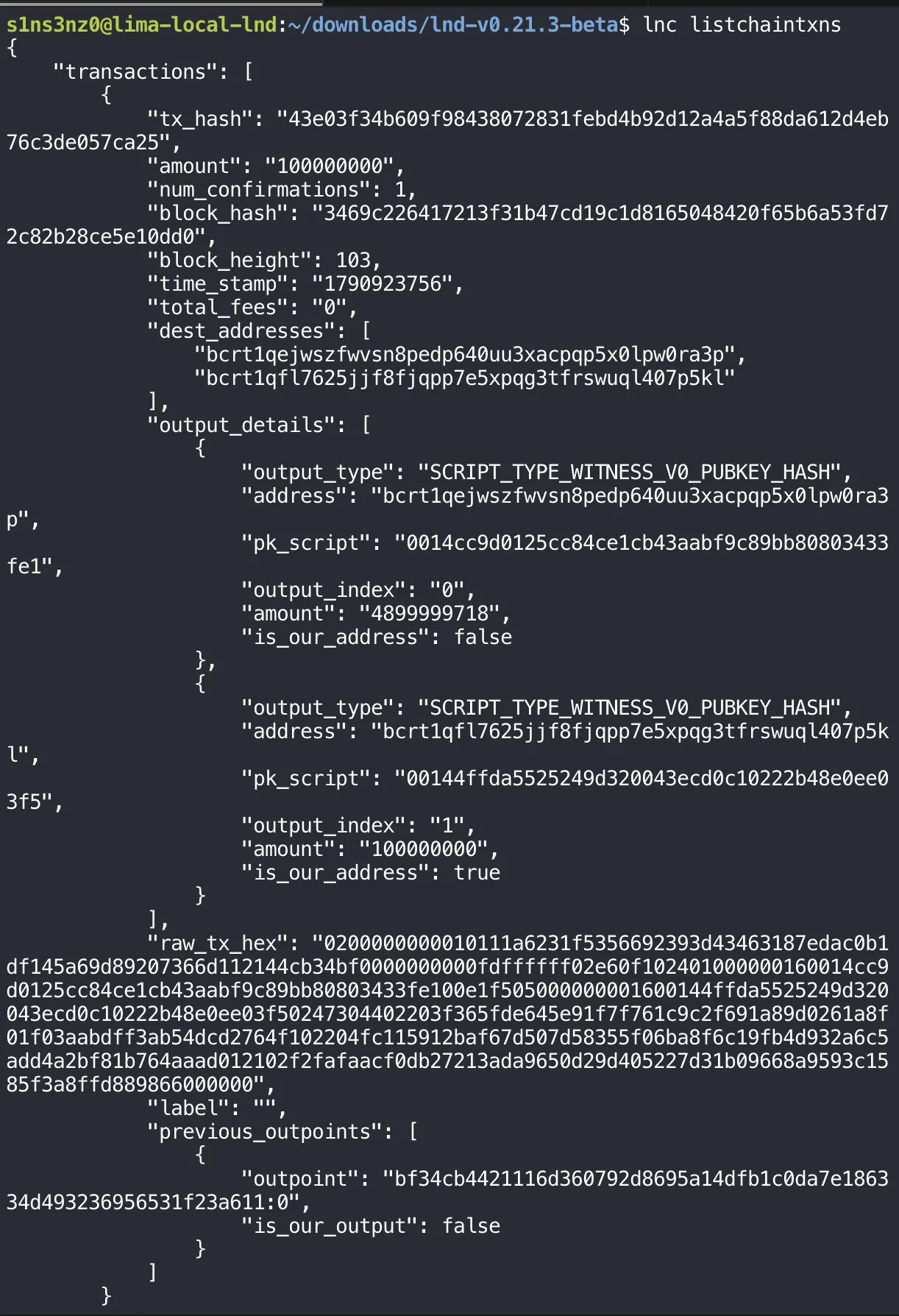
| Field | Value | Meaning |
|---|---|---|
tx_hash | 43e03f…ca25 | The txid sendtoaddress returned |
amount | 100000000 | What this transaction added to LND’s wallet: 1 BTC |
num_confirmations | 1 | One block on top of it so far, the one just mined |
block_hash, block_height | 3469c2…0dd0, 103 | The block generatetoaddress printed, at height 103 |
total_fees | 0 | Fees LND paid. The miner wallet paid them, not LND |
Output 0 | 4,899,999,718 sat, is_our_address: false | Change going back to the miner wallet |
Output 1 | 100,000,000 sat, is_our_address: true | The deposit, to the address from newaddress |
previous_outpoints | bf34cb…a611:0, is_our_output: false | The coin being spent: the miner wallet’s spendable 50 BTC block reward from Part 3 |
The numbers add up. The input was a 50 BTC reward, 5,000,000,000 sat. The two outputs come to 4,999,999,718 sat, so the fee was 282 sat. At the fee_rate=2 I asked for, that’s a 141-vbyte transaction, the usual size of a SegWit payment with one input and two outputs.
The fee, from the sender’s side
LND reports total_fees: 0 because it didn’t pay any. The sender did, and the miner wallet in bitcoind records it directly:
btc -rpcwallet=miner gettransaction \
  43e03f34b609f98438072831febd4b92d12a4a5f88da612d4eb76c3de057ca25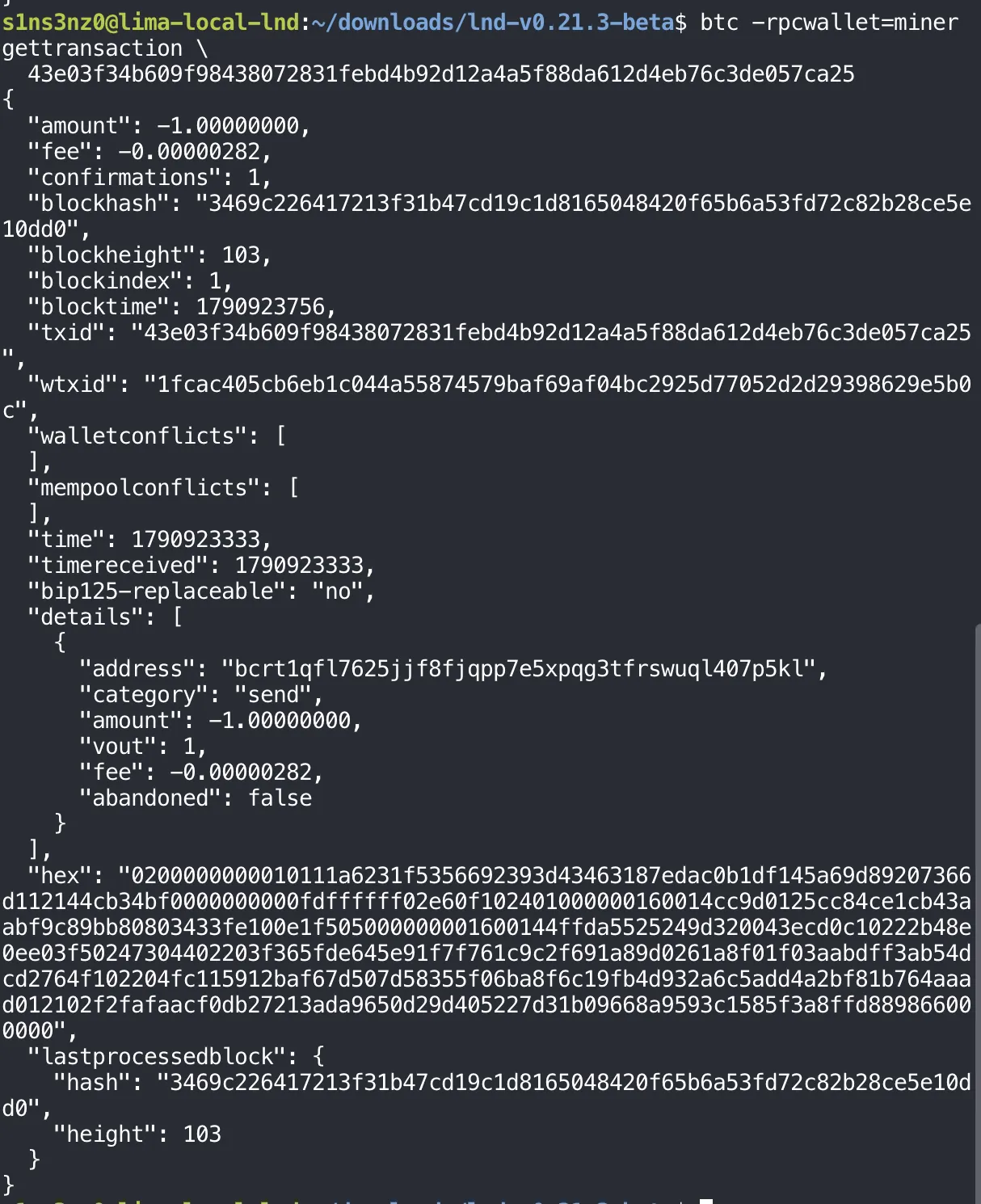
| Field | Value | Meaning |
|---|---|---|
amount | -1.00000000 | 1 BTC left this wallet. Negative, because it’s a send |
fee | -0.00000282 | 282 sat in fees, also paid by this wallet. The figure I worked out from the outputs above, now stated by the wallet itself |
confirmations, blockheight | 1, 103 | The same block LND reported |
blockindex | 1 | Its position in the block. Position 0 is always the block’s own reward transaction, so this payment came right after it |
details[].address, vout | LND’s address, output 1 | Where the 1 BTC went: output 1, the same one LND marked is_our_address: true |
bip125-replaceable | no | The payment didn’t opt in to being replaced by a higher-fee version |
The two wallets describe the same transaction from opposite ends. bitcoind’s miner wallet shows 1 BTC out and 282 sat in fees; LND shows 1 BTC in and no fee of its own. Together they account for every satoshi of the 50 BTC input.
Where this leaves the lab
LND is now a working regtest node: managed by systemd, logged in to Bitcoin Core over RPC with its own credentials, following the chain over ZMQ, and holding 1 BTC of confirmed funds.
A second node, connected
Opening a channel needs a second node. I set one up in the same VM by repeating this series’ steps with its own user, directories, and ports, pointed at the same bitcoind, and with its own lncli shortcut, lnb. Since the setup is identical, I’m not walking through it again; the result is what matters. The two nodes are connected as peers:
lnc listpeers
lnb listpeers

| Node | Sees peer | At address | Meaning |
|---|---|---|---|
lnc (this series’ node) | 0361b9…4191 | 127.0.0.1:9736 | The second node’s Lightning port. lnc dialed out to it |
lnb (second node) | 031a76…0b0d | 127.0.0.1:35388 | lnc’s identity key from its getinfo above. The port is the temporary one lnc’s outgoing connection came from, not a listening port |
Each node lists the other’s public key, so the connection runs both ways. Both nodes share the VM and one bitcoind, which is why loopback addresses work here; nodes on separate machines would need the reachable Lightning port described in “Beyond the lab”.
lnc walletbalance
lnb listchannels
lnc listchannels
lnb walletbalance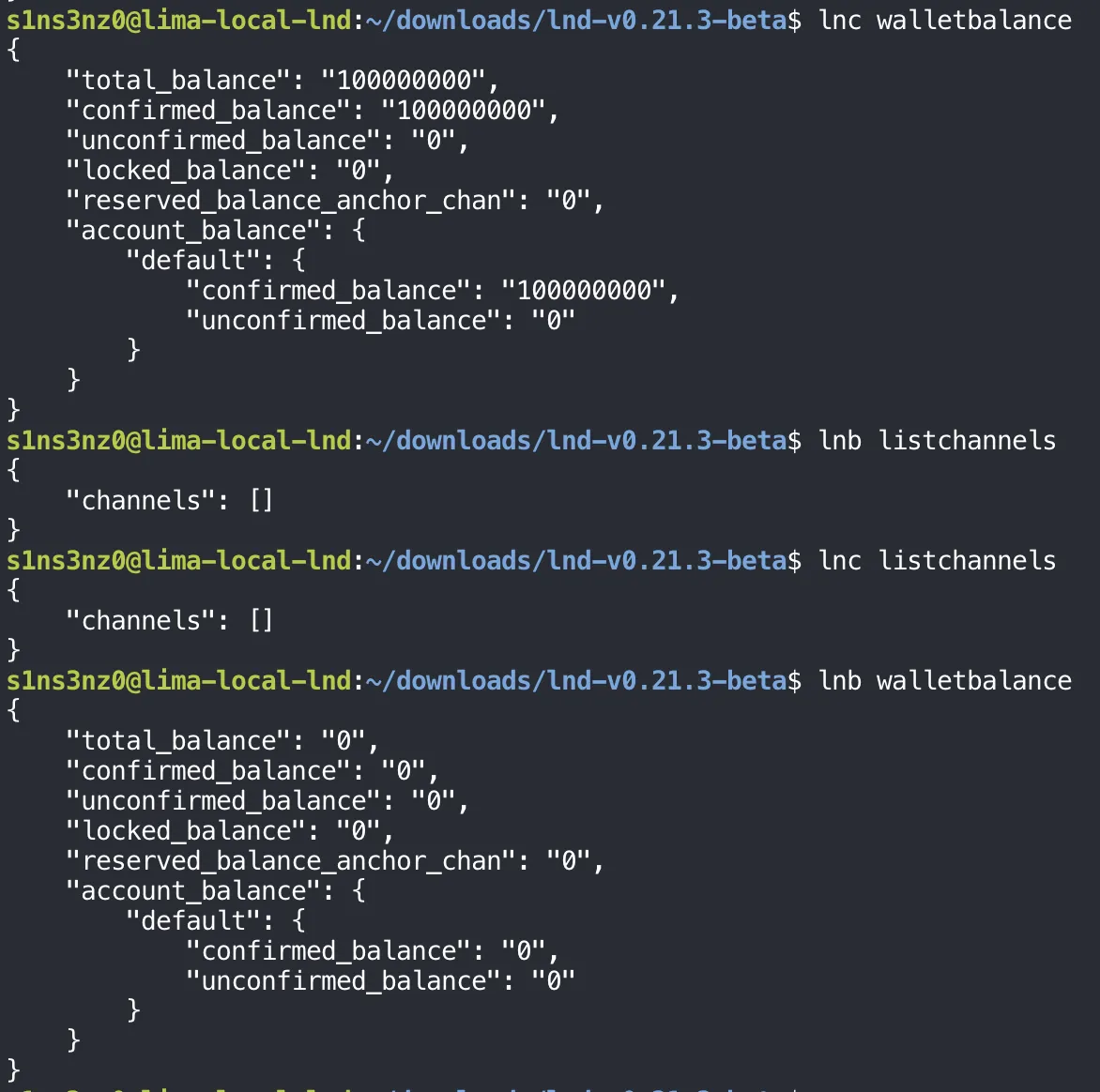
lnc | lnb | |
|---|---|---|
| Confirmed on-chain balance | 100,000,000 sat | 0 |
| Channels | None | None |
The starting position for a channel is set. The nodes are peers, neither has a channel yet, and the funds are on the lnc side, which is the side that will open the channel and commit those funds to it.