This series builds on two earlier ones: Running LND with systemd, Without Containers set up bitcoind and LND on regtest, and Monitoring LND with systemd, Without Containers added lndmon, Prometheus, and Grafana.
Regtest was a private chain: blocks appeared only when I mined them, and the only other node was my own. Testnet4 is a public test network. Blocks arrive on their own schedule, other people’s nodes and channels exist, and the coins still have no value. The goal of this series is a node that stays up there, running continuously, with the monitoring from the last series watching it.
The regtest lab stays where it is. Testnet4 gets its own bitcoind, with its own account, directories, and configuration, next to the regtest one rather than replacing it.
A second bitcoind for testnet4
Its own service account
The first piece is a service account for the testnet4 bitcoind, created the same way as the regtest bitcoin user in the earlier series:
sudo useradd --system --user-group \\
  --home-dir /var/lib/bitcoind-testnet4 \\
  --no-create-home \\
  --shell /usr/sbin/nologin \\
  bitcoin-t4
| Regtest | Testnet4 | |
|---|---|---|
| Account | bitcoin | bitcoin-t4 |
| Home and data directory | /var/lib/bitcoind | /var/lib/bitcoind-testnet4 |
The options are the ones explained in the earlier series: a system account with its own group, no login shell, and a home directory created later with exact permissions. A separate account, rather than reusing bitcoin, keeps the two chains’ data apart at the file-permission level: the regtest bitcoind can’t read testnet4’s files, and the other way around.
Its data directory
Then the data directory, owned by bitcoin-t4 and closed to everyone else, the same 0700 the regtest data directory got:
sudo install -d -o bitcoin-t4 -g bitcoin-t4 -m 0700 \
  /var/lib/bitcoind-testnet4
This is where the testnet4 chain will be downloaded and stored. Unlike regtest’s few kilobytes of self-mined blocks, it holds a real public chain, so it’s also the directory whose size needs watching on a 30 GiB VM disk.
Choosing ports that don’t collide
Two bitcoind processes will share one VM, so the testnet4 node needs ports the regtest node isn’t using:
| Port | Use | Regtest node uses |
|---|---|---|
48332 | Bitcoin Core RPC | 18443 |
48333 | Bitcoin P2P | None (listen=0) |
28334 | ZMQ block notifications | 28332 |
28335 | ZMQ transaction notifications | 28333 |
48332 and 48333 are Bitcoin Core’s own defaults for testnet4, so they need no special reasoning. The ZMQ ports have no per-network default; 28334 and 28335 are simply the next two after the regtest node’s 28332 and 28333.
Before using them, a check that nothing already listens on any of the four:
sudo ss -lntp '( sport = :48332 or sport = :48333 or sport = :28334 or sport = :28335 )'
Only the header line comes back: no process is listening on any of the four ports, so the testnet4 node can take them.
Configuration
A configuration directory owned by root and readable by bitcoin-t4, as /etc/bitcoin was for regtest, and the configuration file in it:
sudo install -d -o root -g bitcoin-t4 -m 0750 \
  /etc/bitcoin-testnet4
sudo tee /etc/bitcoin-testnet4/bitcoin.conf >/dev/null <<'EOF'
testnet4=1
server=1
daemon=0
printtoconsole=1
prune=5120
dbcache=512
[testnet4]
rpcbind=127.0.0.1
rpcallowip=127.0.0.1
rpcport=48332
port=48333
zmqpubrawblock=tcp://127.0.0.1:28334
zmqpubrawtx=tcp://127.0.0.1:28335
EOF![sudo install -d -o root -g bitcoin-t4 -m 0750 /etc/bitcoin-testnet4; sudo tee /etc/bitcoin-testnet4/bitcoin.conf >/dev/null <<'EOF' with testnet4=1, server=1, daemon=0, printtoconsole=1, prune=5120, dbcache=512, then a [testnet4] section with rpcbind=127.0.0.1, rpcallowip=127.0.0.1, rpcport=48332, port=48333, zmqpubrawblock=tcp://127.0.0.1:28334, zmqpubrawtx=tcp://127.0.0.1:28335](/_astro/bitcoin-conf-testnet4.txrpKv_l_Z103VUB.webp)
Compared with the regtest bitcoin.conf:
| Setting | Regtest | Testnet4 | Why |
|---|---|---|---|
| Network | regtest=1 | testnet4=1 | The public test network instead of a private chain |
server, daemon, printtoconsole | 1, 0, 1 | Same | RPC on, foreground for systemd, logs to the journal |
prune | Not set | 5120 | Keep only about 5,120 MB of recent block files and delete older ones, so the chain fits the 30 GiB disk |
dbcache | Default | 512 | 512 MB of memory for the chain-state cache. More cache makes the initial sync faster; 512 MB is a modest share of the VM’s 8 GiB |
txindex | 1 | Not set | A full transaction index needs every block kept, which pruning doesn’t allow |
listen | 0 | Not set | See below |
| RPC | 127.0.0.1:18443 | 127.0.0.1:48332 | Loopback only, on testnet4’s default port |
port | — | 48333 | The P2P port, testnet4’s default |
| ZMQ | 28332, 28333 | 28334, 28335 | Loopback only, clear of the regtest node’s sockets |
The network-specific settings sit under [testnet4], as they sat under [regtest] before.
Two settings change what this node is:
prune=5120. A pruned node still downloads and verifies every block, but only keeps the most recent ones on disk. It’s still a full validating node; it just can’t serve old blocks to others or look them up later. Whether that suits LND, which sometimes needs to fetch older blocks, is something to check once LND connects.- No
listen=0. The regtest node refused incoming P2P connections. This one leaveslistenat its default, which is on, and a testnet4 node needs peers to sync at all. Outgoing connections are what syncing depends on; whether to accept incoming ones, and on which interface, is a separate decision for an always-on node, and worth checking withssafter it starts.
There’s no rpcauth line yet. That, and the file’s own permissions, come next.
The file’s permissions
tee wrote the file, so it got whatever owner and mode a new root-created file gets by default:
sudo ls -l /etc/bitcoin-testnet4/bitcoin.conf
sudo cat /etc/bitcoin-testnet4/bitcoin.conf![sudo ls -l /etc/bitcoin-testnet4/bitcoin.conf shows -rw-r--r-- 1 root root 215 Oct 2 21:23; sudo cat prints the configuration as written: testnet4=1, server=1, daemon=0, printtoconsole=1, prune=5120, dbcache=512, [testnet4], rpcbind=127.0.0.1, rpcallowip=127.0.0.1, rpcport=48332, port=48333, zmqpubrawblock=tcp://127.0.0.1:28334, zmqpubrawtx=tcp://127.0.0.1:28335](/_astro/bitcoin-conf-ls.Bww8wvVC_Z9Qu83.webp)
The content is right, but root:root with 0644 isn’t what the regtest bitcoin.conf ended up with. Two layers are protecting it right now:
| Layer | Owner, mode | Effect |
|---|---|---|
Directory /etc/bitcoin-testnet4 | root:bitcoin-t4, 0750 | Only root and the bitcoin-t4 group can enter it at all |
File bitcoin.conf | root:root, 0644 | Anyone who can reach the file can read it |
Today the directory does the work: other users can’t get into /etc/bitcoin-testnet4, so the file’s open r-- for everyone doesn’t help them. bitcoin-t4 can read the file only through that “everyone” bit, not as its group. That’s fine while the file holds only ports and paths, but it will soon hold an rpcauth line, and the file shouldn’t depend on the directory alone. So it gets the same root:bitcoin-t4 and 0640 as the regtest file, before any credential goes in.
sudo chown root:bitcoin-t4 /etc/bitcoin-testnet4/bitcoin.conf
sudo chmod 0640 /etc/bitcoin-testnet4/bitcoin.conf
Now root owns the file and can write it, bitcoin-t4 reads it through its group, and nobody else can read it, even if they could reach the directory. Both commands print nothing on success.
Running it under systemd
The unit
Starting it
sudo systemctl daemon-reload
sudo systemctl start bitcoind-testnet4
sudo journalctl -u bitcoind-testnet4 -n 50 --no-pager![sudo systemctl daemon-reload; sudo systemctl start bitcoind-testnet4; sudo journalctl -u bitcoind-testnet4 -n 50 --no-pager shows bitcoind[51715] lines at 2026-10-02T12:26:01Z: init message: Pruning blockstore…, initload thread start, and UpdateTip: new best=00000000da84f2bafbbc53dee25a72ae507ff4914b867c565be350b0da8bf043 height=0 version=0x00000001 log2_work=32.000022 tx=1 date='2024-05-03T23:11:00Z' progress=0.000000 cache=0.3MiB(0txo)](/_astro/start-journal-genesis.DqzJMvGa_ZQQSC4.webp)
| Log line | Meaning |
|---|---|
init message: Pruning blockstore… | Startup with prune set: Bitcoin Core checks which old block files it may delete. On an empty data directory there’s nothing to remove yet |
initload thread start | The thread that loads saved state, such as the mempool, has started |
UpdateTip: new best=00000000da84…f043 height=0 | The chain tip is the testnet4 genesis block, at height 0 |
date='2024-05-03T23:11:00Z' | The genesis block’s timestamp. Testnet4 is a young network, started in May 2024 |
progress=0.000000 | The estimated share of the chain verified so far: none |
cache=0.3MiB(0txo) | The chain-state cache is nearly empty, with no unspent outputs yet |
This is the same starting point as regtest in the earlier series, the genesis block at height 0, with one difference: regtest stayed there until I mined, and testnet4 has a real chain to download. From here bitcoind connects to peers, fetches headers and blocks, and UpdateTip lines keep appearing as the height climbs.
Syncing
A few minutes later, getblockchaininfo shows the sync under way. The command runs as bitcoin-t4 with testnet4’s configuration and data directory, so bitcoin-cli finds the right RPC port and cookie:
sudo -u bitcoin-t4 bitcoin-cli \
  -conf=/etc/bitcoin-testnet4/bitcoin.conf \
  -datadir=/var/lib/bitcoind-testnet4 \
  getblockchaininfo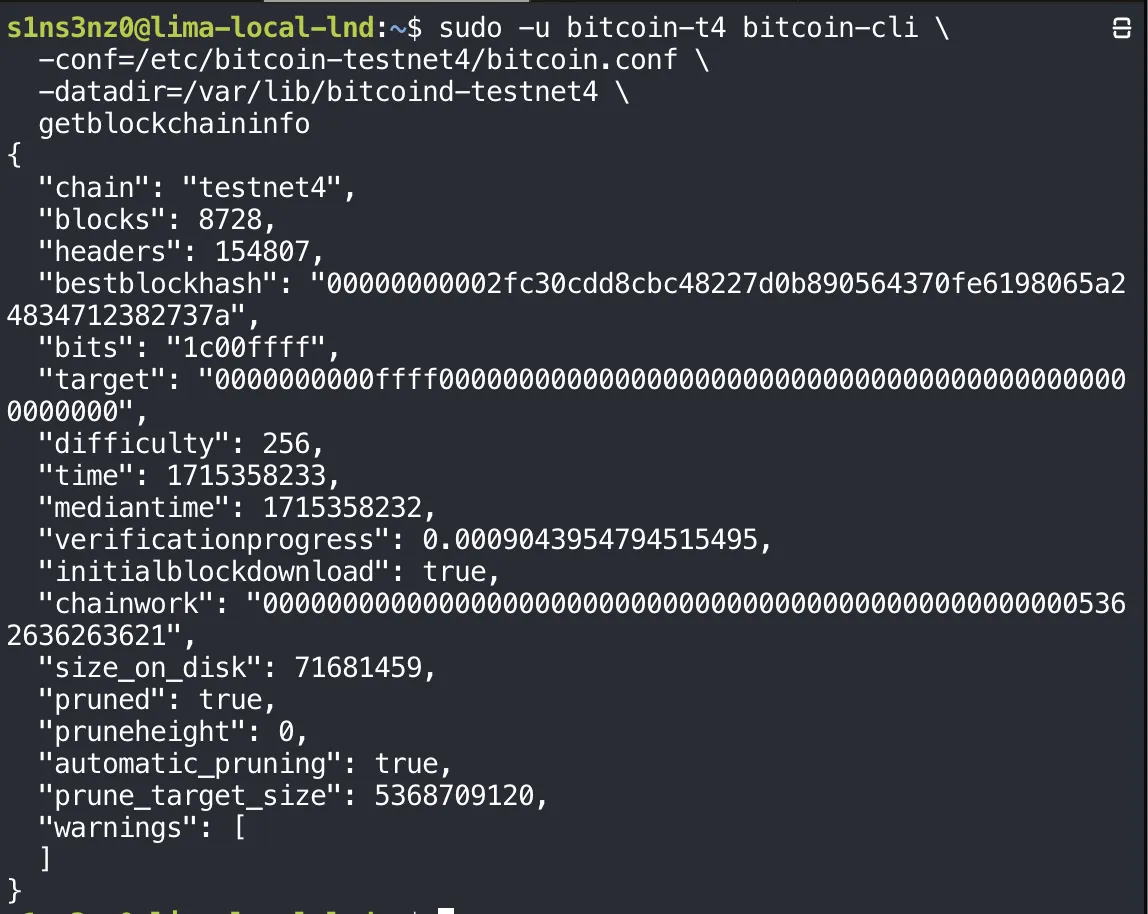
| Field | Value | Meaning |
|---|---|---|
chain | testnet4 | The right network |
headers | 154,807 | Bitcoin Core downloads block headers first. This is how long the testnet4 chain is, as far as the node knows |
blocks | 8,728 | How many of those blocks it has downloaded and fully verified so far |
time | 1715358233 | The timestamp of block 8,728: 10 May 2024, a week after genesis. The node is replaying history in order |
verificationprogress | 0.0009 | Bitcoin Core’s estimate of how much of the chain’s work it has verified: under 0.1% |
initialblockdownload | true | Still in initial block download, and it will be until the tip is recent |
difficulty | 256 | Real proof of work, unlike regtest’s 4.66e-10 |
size_on_disk | 71,681,459 | About 72 MB so far |
pruned, automatic_pruning | true, true | Pruning is on and runs by itself |
pruneheight | 0 | Nothing has been deleted yet; the stored blocks are far below the limit |
prune_target_size | 5,368,709,120 | The prune=5120 setting in bytes: 5,120 × 1,024 × 1,024 |
The gap between headers and blocks is the work left: about 146,000 blocks to download and verify. blocks is already ahead of the progress=0.000000 in the startup log, and once size_on_disk passes about 5 GiB, pruneheight will start to rise as old block files are deleted.
Keeping it running
An always-on node has to come back by itself after the VM restarts, so the unit gets enabled right away:
sudo systemctl enable bitcoind-testnet4
The symlink in multi-user.target.wants/ points at a unit in /etc/systemd/system/, my own file rather than a package’s. With it, a reboot in the middle of the initial download isn’t a problem: systemd starts bitcoind-testnet4 at boot, and it carries on from the blocks already in /var/lib/bitcoind-testnet4, as the regtest node did after its restart test.
LND for testnet4
Its own service account
While bitcoind-testnet4 downloads the chain, LND’s side can be prepared. It gets its own account too, alongside the regtest lnd and lnd-b:
sudo useradd --system --user-group \
  --home-dir /var/lib/lnd-testnet4 \
  --no-create-home \
  --shell /usr/sbin/nologin \
  lnd-t4
| Account | Runs | Data directory |
|---|---|---|
bitcoin | Regtest bitcoind | /var/lib/bitcoind |
lnd, lnd-b | Regtest LND nodes A and B | /var/lib/lnd, /var/lib/lnd-b |
bitcoin-t4 | Testnet4 bitcoind | /var/lib/bitcoind-testnet4 |
lnd-t4 | Testnet4 LND | /var/lib/lnd-testnet4 |
One account per service, each with its own data directory. Like lnd before it, lnd-t4 isn’t in bitcoin-t4’s group, so it can’t read testnet4 bitcoind’s cookie; it will log in to RPC with its own rpcauth credentials, the same arrangement as on regtest.
Its data directory
sudo install -d -o lnd-t4 -g lnd-t4 -m 0700 \
  /var/lib/lnd-testnet4
The same 0700, owner-only directory as /var/lib/lnd. This is where LND will keep the testnet4 wallet, the channel database, its TLS certificate, and the macaroons, so nobody but lnd-t4 gets in.
Its configuration directory
sudo install -d -o root -g lnd-t4 -m 0750 /etc/lnd-testnet4
Root owns it and the lnd-t4 group can read it, the same split as /etc/lnd. The lnd.conf that goes here will hold the RPC password for testnet4’s bitcoind, so LND can read its configuration but never rewrite it.
| Directory | Owner:group | Mode | For |
|---|---|---|---|
/etc/bitcoin-testnet4 | root:bitcoin-t4 | 0750 | Testnet4 bitcoind’s configuration |
/var/lib/bitcoind-testnet4 | bitcoin-t4:bitcoin-t4 | 0700 | Testnet4 chain data |
/etc/lnd-testnet4 | root:lnd-t4 | 0750 | Testnet4 LND’s configuration |
/var/lib/lnd-testnet4 | lnd-t4:lnd-t4 | 0700 | Testnet4 wallet, channels, TLS, macaroons |
The testnet4 stack now mirrors the regtest one directory for directory, under its own names.
RPC credentials for lnd-t4
Testnet4’s LND needs its own login to testnet4’s bitcoind, made with the same rpcauth.py from the earlier series, now for a user named lnd-t4:
python3 ~/downloads/bitcoin-rpcauth/rpcauth.py lnd-t4
The generated rpcauth value and the password are covered.
These are new credentials, not the regtest lnd ones. Each bitcoind gets only the rpcauth line for the LND that talks to it, so the regtest password opens nothing on testnet4, and a leak on one side doesn’t reach the other. The rpcauth= line goes into /etc/bitcoin-testnet4/bitcoin.conf; the password goes into testnet4 LND’s lnd.conf.
The rpcauth= line goes in with sudoedit, the same way Grafana’s configuration was edited in the monitoring series:
sudoedit /etc/bitcoin-testnet4/bitcoin.conf
Editing the existing file this way, rather than rewriting it with tee as when it was created, keeps the root:bitcoin-t4 owner and 0640 mode set earlier. sudoedit writes the edited copy back into the original file, so its ownership and permissions stay as they are.
sudo cat /etc/bitcoin-testnet4/bitcoin.conf![sudo cat /etc/bitcoin-testnet4/bitcoin.conf: testnet4=1, server=1, daemon=0, printtoconsole=1, prune=5120, dbcache=512, then rpcauth= followed by a covered value, then [testnet4]](/_astro/bitcoin-conf-with-rpcauth.BUObBbQU_2v2oYG.webp)
The salt and HMAC are covered.
The rpcauth line sits with the general settings, above [testnet4], where the regtest file had its own. As covered in the earlier series, rpcauth isn’t one of the network-specific options that must go inside a section.
bitcoind reads rpcauth only at startup, so the node restarts to pick it up:
sudo systemctl restart bitcoind-testnet4
sudo systemctl status bitcoind-testnet4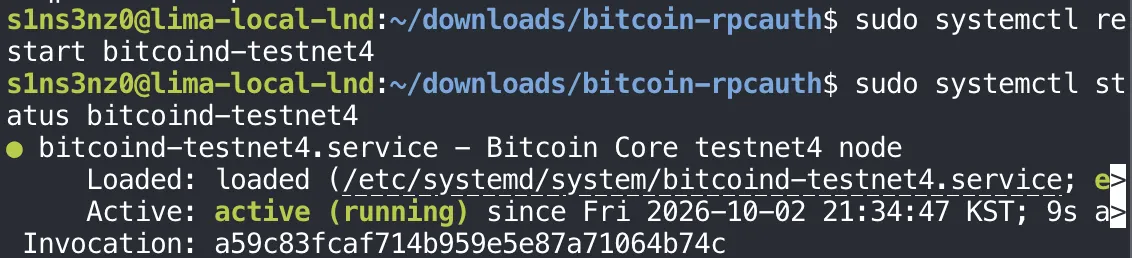
It’s back up nine seconds later. The restart interrupts the initial download only briefly: on startup bitcoind picks up from the blocks it already verified, and the shutdown before it had time to flush its databases, as the regtest restart test showed. The right edge of the status output is cut off because this status ran without --no-pager -l.
Logging in as lnd-t4
The login test follows the regtest one: read the password without echoing it, then hand it to bitcoin-cli on standard input.
read -r -s -p 'testnet4 Core RPC password: ' T4_RPC_PASSWORD
Nothing appears where the password was typed, which is -s doing its job. The next shell prompt lands on the same line as the question because read -s also suppresses the newline from pressing Enter, a cosmetic quirk rather than an error. As on regtest, T4_RPC_PASSWORD is a plain shell variable, not exported, so it stays in this shell.
Then the login itself, as lnd-t4, with no configuration file and no access to the cookie:
printf '%s\n' "$T4_RPC_PASSWORD" |
  sudo -u lnd-t4 bitcoin-cli \
    -conf=/dev/null \
    -datadir=/var/lib/lnd-testnet4 \
    -testnet4 \
    -rpcconnect=127.0.0.1 \
    -rpcport=48332 \
    -rpcuser=lnd-t4 \
    -stdinrpcpass \
    getblockchaininfo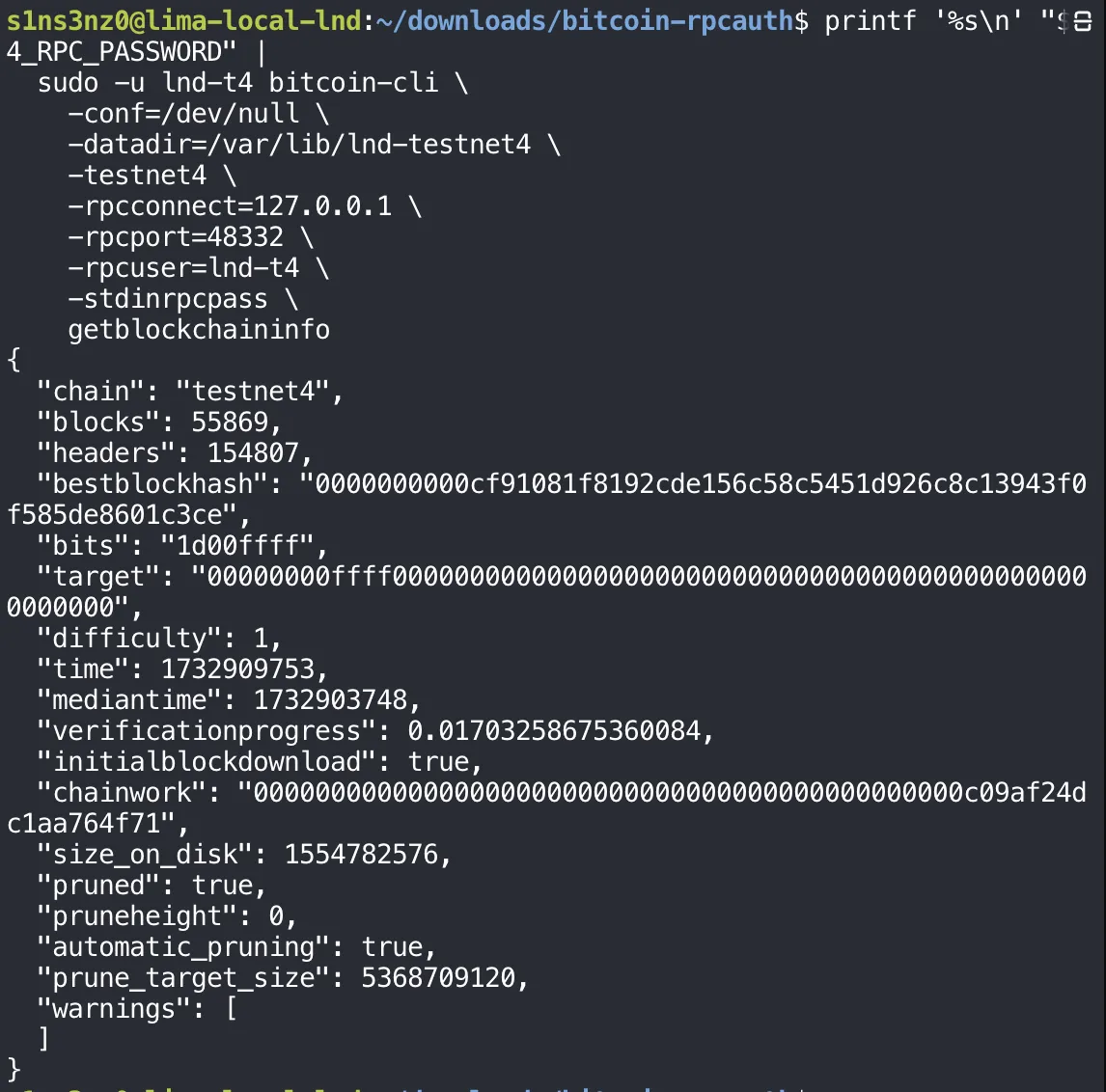
| Option | Compared with the regtest test |
|---|---|
sudo -u lnd-t4 | The testnet4 LND account instead of lnd |
-datadir=/var/lib/lnd-testnet4 | Testnet4 LND’s directory, which has no .cookie in it |
-testnet4, -rpcport=48332 | The testnet4 network and its RPC port, instead of -regtest and 18443 |
-rpcuser=lnd-t4 | The new rpcauth user |
-conf=/dev/null and a data directory without a cookie leave rpcauth as the only way this login could work, the same reasoning as on regtest. It worked: the answer is testnet4’s chain, from the account LND will run as.
The same output doubles as a sync check, a few minutes after the first one:
| Field | Earlier | Now |
|---|---|---|
blocks | 8,728 | 55,869 |
headers | 154,807 | 154,807 |
time of the newest verified block | 10 May 2024 | 29 November 2024 |
verificationprogress | 0.0009 | 0.017 |
size_on_disk | 72 MB | 1.55 GB |
pruneheight | 0 | 0 |
The node has worked through about a third of the chain by block count, and the restart for rpcauth didn’t set it back. verificationprogress is still low because Bitcoin Core weighs progress by transactions, not blocks, and later blocks carry more of them. At 1.55 GB, the data is still under the 5 GiB prune target, so nothing has been deleted yet.
difficulty dropped from 256 to 1 between the two checks. That’s a property of the blocks being verified, not of the node: testnet4 keeps a rule that lets a block be mined at the minimum difficulty when none has been found for 20 minutes, so difficulty-1 blocks appear throughout its history.
lnd.conf
Testnet4 LND’s configuration, in /etc/lnd-testnet4/lnd.conf:
sudo cat /etc/lnd-testnet4/lnd.conf![sudo cat /etc/lnd-testnet4/lnd.conf: [Application Options] alias=local-lnd-testnet4, listen=127.0.0.1:9737, rpclisten=127.0.0.1:10011, restlisten=127.0.0.1:8082; [Bitcoin] bitcoin.testnet4=1, bitcoin.node=bitcoind; [Bitcoind] bitcoind.rpchost=127.0.0.1:48332, bitcoind.rpcuser= and bitcoind.rpcpass= with covered values, bitcoind.zmqpubrawblock=tcp://127.0.0.1:28334, bitcoind.zmqpubrawtx=tcp://127.0.0.1:28335](/_astro/lnd-conf-testnet4._lEcc2n0_SxhsW.webp)
The RPC user and password are covered.
Set beside the regtest node A’s lnd.conf:
| Setting | Regtest node A | Testnet4 |
|---|---|---|
alias | local-lnd | local-lnd-testnet4 |
listen (Lightning P2P) | 127.0.0.1:9735 | 127.0.0.1:9737 |
rpclisten (gRPC) | 127.0.0.1:10009 | 127.0.0.1:10011 |
restlisten (REST) | 127.0.0.1:8080 | 127.0.0.1:8082 |
| Network | bitcoin.active=1, bitcoin.regtest=1 | bitcoin.testnet4=1 |
bitcoind.rpchost | 127.0.0.1:18443 | 127.0.0.1:48332 |
bitcoind.rpcuser, rpcpass | The regtest lnd login | The new lnd-t4 login |
| ZMQ | 28332, 28333 | 28334, 28335 |
Each port is one past what the regtest nodes use (node B took 9736 and 10010), so three LND nodes can run in the same VM without colliding. bitcoin.active is gone: LND’s log flagged it as deprecated on regtest, and bitcoin.testnet4=1 is enough on its own. The [Bitcoind] section points at testnet4’s bitcoind and nothing else: its RPC port, the rpcauth login just tested, and the two ZMQ sockets from its bitcoin.conf.
Two things are deliberately unchanged for now. Every listener is on loopback, including Lightning P2P on 9737, so this node can open connections to testnet4 peers but can’t accept them from outside the VM. And bitcoind is pruned, so LND will be running against a backend that doesn’t keep old blocks. Both are fine for a first start and worth revisiting once it runs.
This file holds the RPC password in plain text, so it gets the same ownership as the regtest lnd.conf:
sudo chown root:lnd-t4 /etc/lnd-testnet4/lnd.conf
Root owns it, and the lnd-t4 group, which only testnet4’s LND belongs to, is the group that may read it.
sudo chmod 0640 /etc/lnd-testnet4/lnd.conf
0640: root reads and writes, the lnd-t4 group reads, and everyone else gets nothing, so the password is no longer readable by “others” even if they reached the directory. Owner and mode now match the regtest lnd.conf.
LND’s unit
sudo tee /etc/systemd/system/lnd-testnet4.service >/dev/null <<'EOF'
[Unit]
Description=LND testnet4 node
Wants=bitcoind-testnet4.service
After=bitcoind-testnet4.service

[Service]
Type=simple
User=lnd-t4
Group=lnd-t4
ExecStart=/usr/local/bin/lnd --configfile=/etc/lnd-testnet4/lnd.conf --lnddir=/var/lib/lnd-testnet4
Restart=on-failure
RestartSec=5
TimeoutStopSec=300
UMask=0077
NoNewPrivileges=true
ProtectHome=true
ProtectSystem=full

[Install]
WantedBy=multi-user.target
EOF![sudo tee /etc/systemd/system/lnd-testnet4.service >/dev/null <<'EOF' with [Unit] Description=LND testnet4 node, Wants=bitcoind-testnet4.service, After=bitcoind-testnet4.service; [Service] Type=simple, User=lnd-t4, Group=lnd-t4, ExecStart=/usr/local/bin/lnd --configfile=/etc/lnd-testnet4/lnd.conf --lnddir=/var/lib/lnd-testnet4, Restart=on-failure, RestartSec=5, TimeoutStopSec=300, UMask=0077, NoNewPrivileges=true, ProtectHome=true, ProtectSystem=full; [Install] WantedBy=multi-user.target](/_astro/lnd-testnet4-unit.DHZmpVSm_Z1J7rza.webp)
It’s the regtest lnd.service with every name swapped for its testnet4 counterpart:
| Directive | lnd.service (regtest) | lnd-testnet4.service |
|---|---|---|
Description | LND regtest node | LND testnet4 node |
Wants, After | bitcoind.service | bitcoind-testnet4.service |
User, Group | lnd | lnd-t4 |
--configfile | /etc/lnd/lnd.conf | /etc/lnd-testnet4/lnd.conf |
--lnddir | /var/lib/lnd | /var/lib/lnd-testnet4 |
The restart policy, the five-minute stop window, and the hardening lines are identical, and mean what they did in the earlier series. The dependency is the part that matters most here: lnd-testnet4 pulls in bitcoind-testnet4, never the regtest bitcoind, so the two stacks start and stop independently.
As before, After= orders the processes and nothing more. bitcoind-testnet4 is still in its initial download, and LND will start against a backend that isn’t caught up yet. How LND behaves in that state is something its log will show.
Starting it
Once started, testnet4’s LND stops at the same place the regtest one did on its first run:
![The journal for lnd-testnet4 shows lnd[52531] at 2026-10-02 21:44:46: [INF] LTND: Waiting for wallet encryption password. Use lncli create to create a wallet, lncli unlock to unlock an existing wallet, or lncli changepassword to change the password of an existing wallet and unlock it.](/_astro/lnd-t4-waiting-wallet.DIKOlcvK_1J1Y1X.webp)
Waiting for wallet encryption password means LND has opened its databases under /var/lib/lnd-testnet4 and is now waiting for a wallet. It’s a fresh data directory, so there is none to unlock: the next step is lncli create. Until a wallet exists and is unlocked, LND doesn’t start its chain backend, so it hasn’t contacted bitcoind-testnet4 yet, and the half-finished sync hasn’t come into play.
A shortcut and the wallet
First a shortcut for testnet4’s lncli, built like lnc for regtest, then the wallet:
lnt() {
  sudo -u lnd-t4 lncli \
    --lnddir=/var/lib/lnd-testnet4 \
    --network=testnet4 \
    --rpcserver=127.0.0.1:10011 \
    "$@"
}
lnt create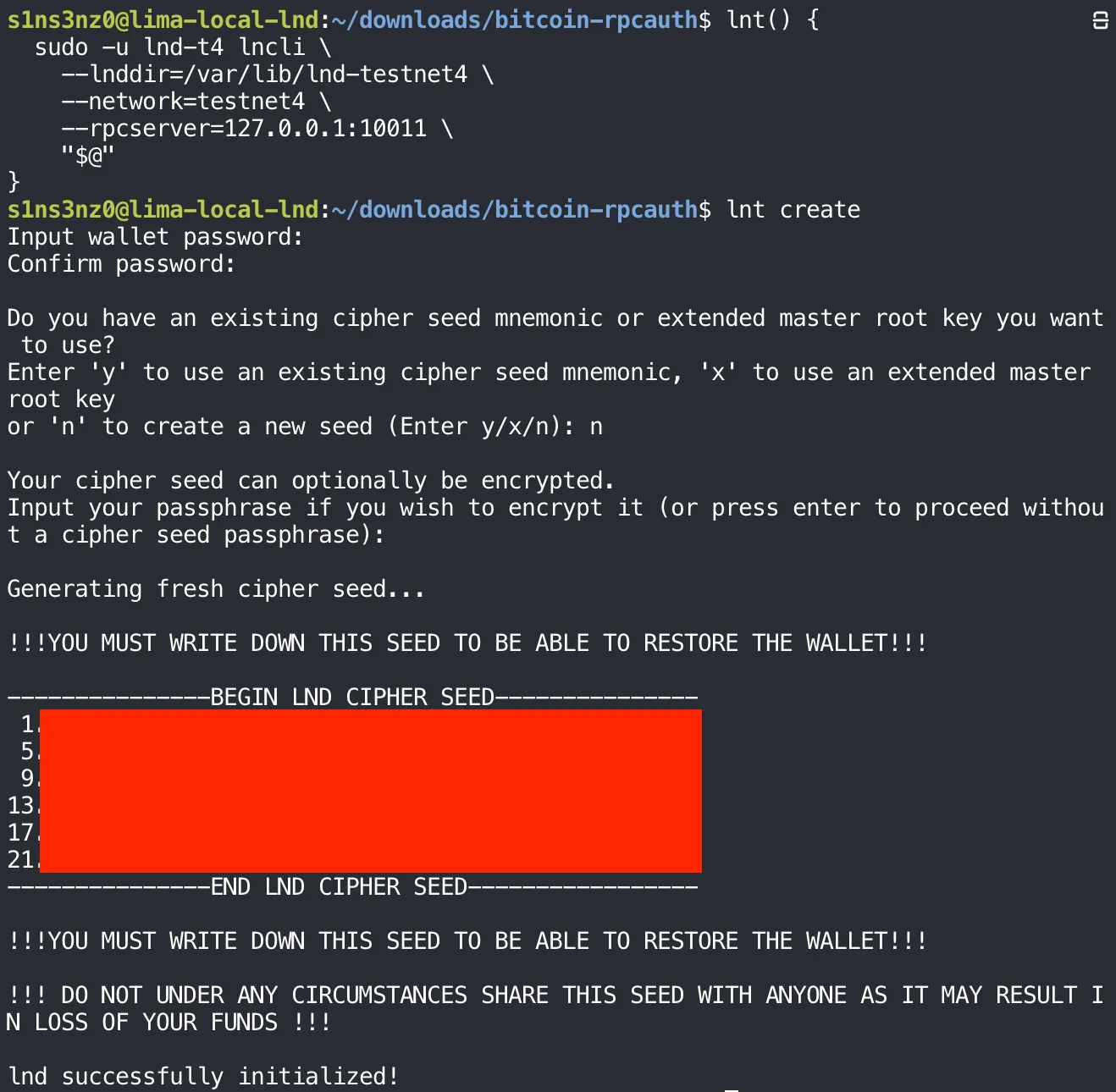
The cipher seed is covered.
| Shortcut | Account | --lnddir | --network | --rpcserver |
|---|---|---|---|---|
lnc | lnd | /var/lib/lnd | regtest | 127.0.0.1:10009 |
lnb | lnd-b | /var/lib/lnd-b | regtest | 127.0.0.1:10010 |
lnt | lnd-t4 | /var/lib/lnd-testnet4 | testnet4 | 127.0.0.1:10011 |
Three LND nodes in one VM make a shortcut per node more than a convenience: each one bundles the account, directory, network, and port that belong together, so a command can’t be sent to the wrong node by a mistyped flag.
The create dialog is the one from the regtest series: a wallet password, n for a new seed, no seed passphrase, then 24 words. This wallet is new and separate. Its seed restores only the testnet4 node, and the regtest wallets’ seeds have nothing to do with it. These are still worthless test coins, but this node is meant to stay up, so its seed is written down and stored away from the VM the same way a mainnet seed would be.
LND meets a backend that’s still syncing
With the wallet unlocked, LND starts its chain backend and connects to bitcoind-testnet4. getinfo shows what it sees:
lnt getinfo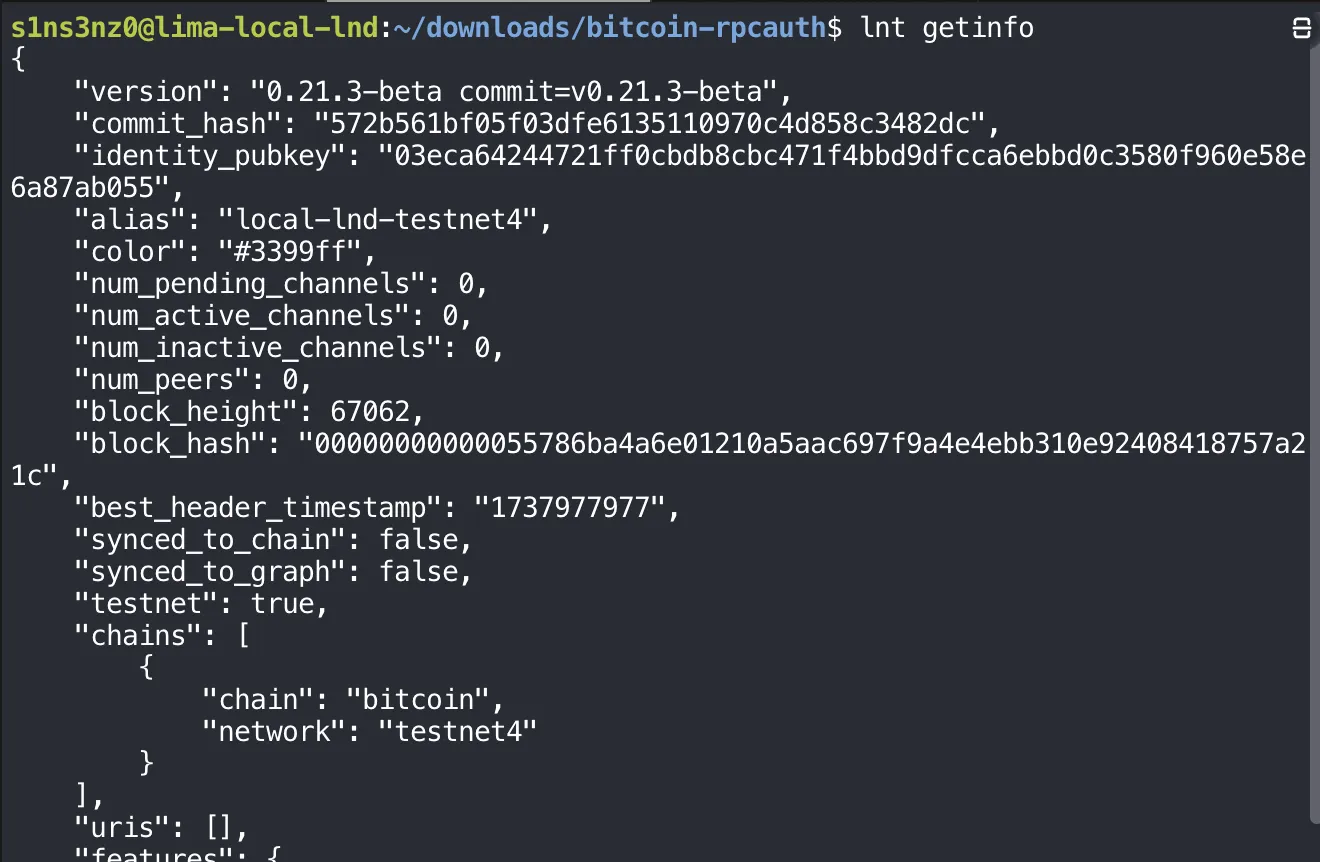
| Field | Value | Meaning |
|---|---|---|
identity_pubkey | 03eca642…ab055 | The testnet4 node’s own key, from the new wallet. Different from both regtest nodes |
alias | local-lnd-testnet4 | From lnd.conf |
chains | bitcoin, testnet4 | The right network. testnet: true marks it as a test network |
block_height | 67,062 | Where bitcoind-testnet4 is in its download right now |
best_header_timestamp | 1737977977 | That block’s time: 27 January 2025, well behind the present |
synced_to_chain | false | LND knows the backend isn’t caught up |
num_peers, channels | 0 | No Lightning peers or channels yet |
uris | [] | Nothing advertised, since P2P is on loopback |
The height says the RPC login and the ZMQ feeds work: LND can only know block 67,062 by asking testnet4’s bitcoind, and it moved past the 55,869 of the earlier check. It also shows how LND handles a backend in the middle of its initial download. It doesn’t fail or restart; it reports the height bitcoind has reached and marks itself not synced. synced_to_chain will turn true once bitcoind-testnet4 reaches the tip, about 87,000 blocks further on.
Where this part ends
The testnet4 stack runs next to the regtest one, sharing nothing but the binaries and the VM:
Testnet4 bitcoind | Testnet4 LND | |
|---|---|---|
| Account | bitcoin-t4 | lnd-t4 |
| Unit | bitcoind-testnet4.service, enabled | lnd-testnet4.service |
| Configuration | /etc/bitcoin-testnet4/bitcoin.conf | /etc/lnd-testnet4/lnd.conf |
| Data | /var/lib/bitcoind-testnet4, pruned to about 5 GiB | /var/lib/lnd-testnet4, with a new wallet |
| Listens on | RPC 127.0.0.1:48332, ZMQ 28334/28335, P2P 48333 | gRPC 127.0.0.1:10011, REST 8082, P2P 9737 |
bitcoind-testnet4 is still working through its initial download, and LND is connected to it, following along and waiting to be in sync. The next part picks up once the chain is caught up: enabling LND for boot, confirming synced_to_chain, and bringing the testnet4 node into lndmon, Prometheus, and Grafana.