Vault Secret Management for Hoodi Validator
An Ethereum validator uses several types of secrets to perform its duties safely. Some protect communication between components. Others unlock the validator signing key or provide access to signing history.
In this project, Vault stores those secrets, and Vault Agent delivers them to the consuming pods. The applications then use the rendered files to synchronize the node, request signatures, sign validator operations, and maintain slashing protection.
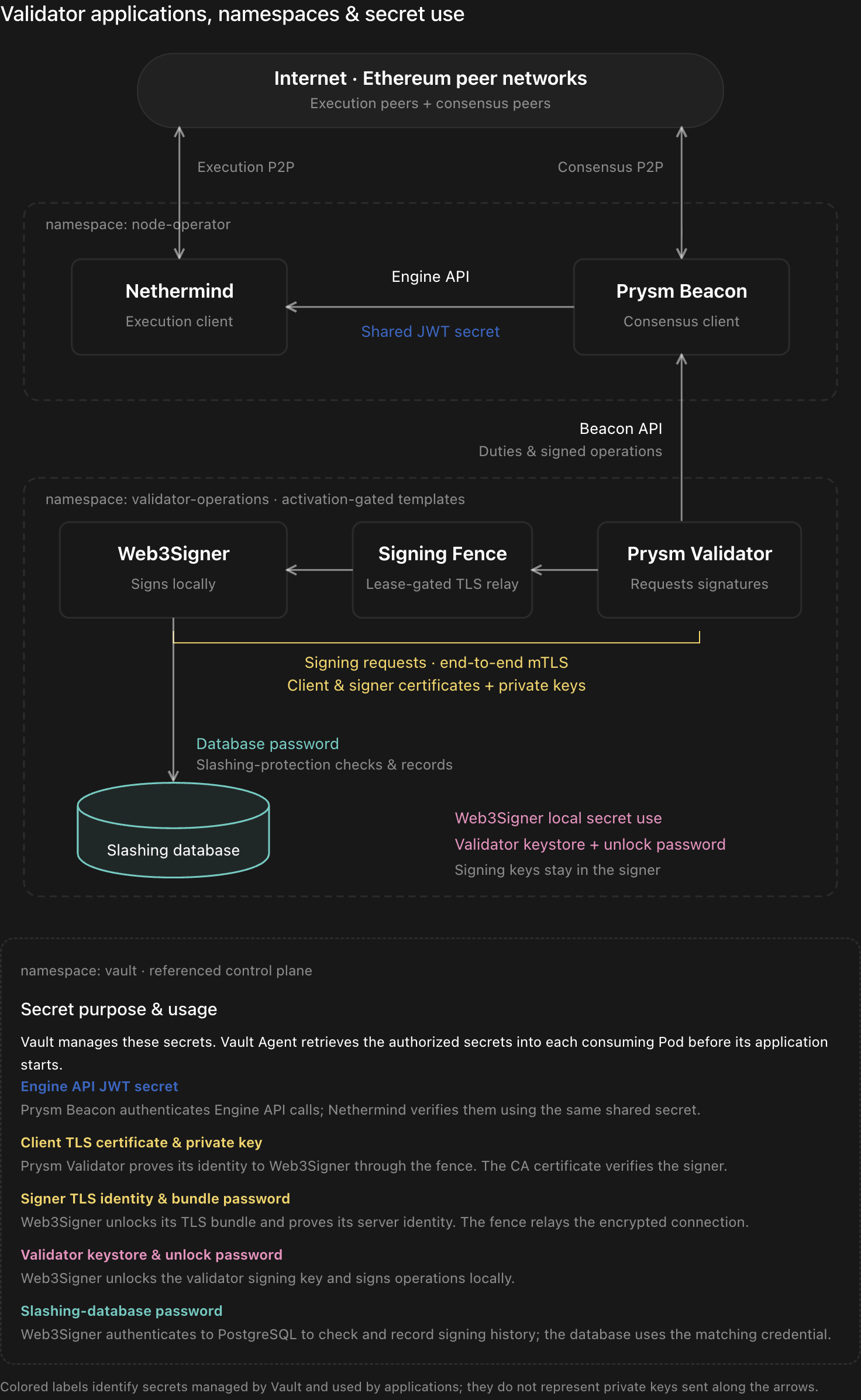
The diagram shows the declared architecture. Its colored labels identify where secrets are used; they do not mean private keys travel along the application-request arrows.
Understanding Validator Activity
Read the diagram from top to bottom.
In the node-operator namespace, Nethermind communicates with execution peers while Prysm Beacon communicates with consensus peers. Prysm Beacon also calls Nethermind through the Engine API.
In validator-operations, Prysm Validator obtains duties from the beacon node and prepares signing requests. Those requests pass through the signing fence to Web3Signer. Web3Signer uses the validator key locally and consults PostgreSQL for slashing protection.
Vault supports these activities by supplying secrets. It does not schedule validator duties, relay signing traffic, or maintain the slashing database.
| Component | Main activity | Secret use |
|---|---|---|
| Nethermind | Executes and validates execution payloads | Verifies Engine API authentication |
| Prysm Beacon | Maintains consensus state and coordinates with execution | Authenticates Engine API calls |
| Prysm Validator | Performs duties and requests signatures | Establishes the protected signing connection |
| Signing Fence | Permits or closes the signing path | Relays encrypted traffic without endpoint private keys |
| Web3Signer | Signs validator operations | Unlocks the keystore, serves TLS, and accesses PostgreSQL |
| PostgreSQL | Preserves slashing-protection history | Accepts the configured database credential |
The Engine API JWT Connects Execution and Consensus
The blue label in the diagram represents the shared Engine API JWT secret.
Prysm Beacon uses this secret to authenticate Engine API calls. Nethermind verifies those calls using the same secret. Both applications must receive matching values.
The project references this Vault record:
node-operator-runtime/data/nodes/hoodi/engine-api-jwtVault Agent renders its jwt field into a file:
vault.hashicorp.com/agent-inject-secret-engine.jwt: node-operator-runtime/data/nodes/hoodi/engine-api-jwt

vault.hashicorp.com/agent-inject-template-engine.jwt: |
  {{- with secret "node-operator-runtime/data/nodes/hoodi/engine-api-jwt" -}}
  {{ .Data.data.jwt }}
  {{- end }}
The clients consume the resulting file:
Nethermind:
--JsonRpc.JwtSecretFile=/vault/secrets/engine.jwt

Prysm Beacon:
--jwt-secret=/vault/secrets/engine.jwt
This secret belongs to the execution–consensus connection. It is not the validator signing key and is not distributed to Ethereum peers.
Replacing it requires coordination: updating only one application can interrupt authenticated Engine API communication.
Prysm Validator Requests Signatures Without Holding the Signing Key
Prysm Validator communicates with Prysm Beacon to obtain duties and submit signed operations.
When it needs a signature, it sends a request through the signing fence to Web3Signer. The validator client does not need the encrypted validator keystore or its unlock password.
Instead, its relevant secret material is the client TLS certificate and private key, stored under:
node-operator-runtime/data/validators/hoodi/<validator-set>/runtime/client-tlsThese files protect access to the signing service:
- The client certificate and private key authenticate the client during the TLS handshake.
- The trusted CA certificate allows the client to verify the signer’s certificate.
The TLS private key and the Ethereum validator signing key serve different purposes. Replacing the client TLS certificate changes the protected connection’s credentials; it does not change the validator’s signing key.
The CA certificate is trust material rather than a secret private key, but its integrity still matters.
The Signing Fence Controls When Requests Can Reach Web3Signer
The signing fence is the middle component in the diagram’s signing path.
It operates as a TLS passthrough proxy. The encrypted connection runs between Prysm Validator and Web3Signer, while the fence relays its bytes. It does not terminate TLS or inspect signing-request contents.
Consequently, the fence does not need the validator keystore or the endpoint TLS private keys to perform its relay function.
Its authority comes from a Kubernetes Lease. The implementation checks and renews that authority and is designed to close its listener and active connections when authority is lost.
| Mechanism | Protection provided |
|---|---|
| End-to-end TLS | Protects communication between the validator client and signer |
| Signing fence | Controls whether the signing connection may remain open |
| Slashing database | Preserves history used to reject conflicting signatures |
The fence cannot retract a request already accepted by Web3Signer. That is why it complements, rather than replaces, persistent slashing protection.
The Kubernetes Lease is also distinct from a Vault lease: it controls relay authority, not the lifetime of a Vault-issued credential.
Web3Signer Unlocks and Uses the Validator Key Locally
The pink annotation identifies the secrets Web3Signer uses for validator signing:
- An encrypted validator keystore.
- The password required to unlock it.
The project stores these as separate runtime records:
node-operator-runtime/data/validators/hoodi/<validator-set>/runtime/keystorenode-operator-runtime/data/validators/hoodi/<validator-set>/runtime/passwordThe application configuration points Web3Signer at the rendered files:
args:
  - eth2
  - --network=hoodi
  - --keystores-path=/vault/secrets
  - --keystores-passwords-path=/vault/secrets
Web3Signer loads the keystore, unlocks the key, and performs signing locally. The signature returns through the existing connection to Prysm Validator.
The statement “signing keys stay in the signer” refers to the application signing path. The encrypted keystore and password are delivered from Vault to the signer pod, but the private signing key is not returned to Prysm Validator through the signing API.
This validator path does not call Vault Transit for each signature. The project’s release-signing use of Transit is a separate activity.
Signer TLS Material Protects the Signing Endpoint
Web3Signer needs a TLS certificate and private key to serve its protected endpoint.
The project delivers these through a PKCS#12 bundle and a separate bundle-password file:
args:
  - --tls-keystore-file=/vault/secrets/tls.p12
  - --tls-keystore-password-file=/vault/secrets/tls-password.txt
  - --tls-known-clients-file=/etc/web3signer-known-clients/known-clients.txt
The bundle password unlocks the TLS bundle. It is different from the password that unlocks the validator keystore.
The known-clients file contains the approved client certificate fingerprint and is provisioned separately from the Vault-held signing and server TLS material.
This creates two distinct secret groups inside the signer:
| Secret group | Purpose |
|---|---|
| Signer TLS bundle and password | Protects the signing endpoint |
| Validator keystore and password | Produces Ethereum validator signatures |
Certificate renewal must account for both delivery and trust. A replacement certificate is useful only after the consuming application loads it and its peer accepts it.
The Database Password Enables Slashing-Protection Checks
The turquoise label represents the password used to access PostgreSQL.
Web3Signer maintains records of signed blocks and attestations so that it can reject conflicting operations. PostgreSQL provides the persistent storage for that history. Consensys: Web3Signer slashing protection.
The project explicitly enables slashing protection:
args:
  - --slashing-protection-enabled=true
  - --slashing-protection-db-url=jdbc:postgresql://validator-REPLACE_WITH_VALIDATOR_SET-slashing-db.validator-operations.svc:5432/web3signer
  - --slashing-protection-db-username=web3signer
  - --slashing-protection-db-pool-configuration-file=/vault/secrets/slashing-db.properties
  - --slashing-protection-pruning-db-pool-configuration-file=/vault/secrets/slashing-db.properties
Vault supplies the password through:
node-operator-runtime/data/validators/hoodi/<validator-set>/runtime/slashing-db-passwordThe signer consumes a rendered properties file. PostgreSQL must accept the matching credential.
Two assets must remain separate in the explanation:
- Vault stores the database credential.
- PostgreSQL stores the signing history.
Recovering the password does not recover the history. A replacement signer with the correct key and password still needs the correct slashing-protection database state.
Similarly, updating a password in Vault does not automatically change the credential accepted by an existing PostgreSQL database.
Vault Agent Delivers Secrets Before Startup
The relevant workload templates use:
vault.hashicorp.com/agent-inject: "true"
vault.hashicorp.com/agent-pre-populate-only: "true"
This configures initialization-time delivery. Vault Agent retrieves and renders the secret files before the application starts, then exits. It does not remain as a continuously running sidecar in this configuration. HashiCorp: Agent Injector annotations.
The startup sequence is:
- Kubernetes creates the application pod.
- Vault Agent retrieves the configured secret records.
- Templates render the required files into the shared secrets volume.
- The application starts and reads those files.
- Validator activity proceeds using the loaded material.
Vault therefore supports preparation of the applications without participating in every subsequent signing request.
This also explains why a changed Vault record does not automatically update a running application. The replacement must be delivered and loaded through a controlled restart or another explicitly implemented refresh mechanism.
Secret Rotation Must Follow Application Dependencies
Secret rotation is complete when the affected applications successfully use the replacement.
| Secret being changed | Coordination required |
|---|---|
| Engine API JWT | Nethermind and Prysm Beacon must load matching values |
| Client TLS material | Prysm Validator and Web3Signer’s approved-client configuration must agree |
| Signer TLS material | Web3Signer must load it and the validator must trust it |
| Database password | PostgreSQL and Web3Signer must use compatible credentials |
| Keystore password | The password must match the encrypted keystore |
| Validator signing key | Requires a validator-specific custody and protocol procedure |
The project includes narrowly scoped permissions for updating the signer and client TLS records while denying changes to the validator keystore, its password, and the database password.
That separation helps keep certificate maintenance from becoming an unintended change to validator custody.
Recovery Must Preserve Both Secrets and Signing History
A validator recovery involves more than retrieving the correct secrets.
Three conditions must be satisfied together:
- Correct key material: Web3Signer can load the intended validator key.
- Correct signing history: The recovered system retains the relevant slashing-protection state.
- Exclusive active path: The previous signing path is closed before the replacement becomes active.
Revoking Vault access prevents future authorized retrieval. It does not remove a key already loaded into Web3Signer’s memory. The signing path must therefore be fenced explicitly when stopping or replacing an active validator.
Withdrawal credentials remain separately controlled and are not ordinary runtime inputs to the validator client or signer in this design.
Vault’s role is to protect and deliver the secrets required by each application. Safe validator operation also depends on the fence, the signer’s behavior, persistent slashing history, and coordinated activation and recovery procedures.